mirror of
https://github.com/stack-auth/stack.git
synced 2026-07-20 21:29:36 +08:00
promptless/document-developer-tools
3104
Commits
| Author | SHA1 | Message | Date | |
|---|---|---|---|---|
 promptless[bot] promptless[bot]
|
9fe7f1232d |
Merge branch 'dev' into promptless/document-developer-tools
DB migration compat / Check if migrations changed (push) Has been cancelled
DB migration compat / Back-compat — Current branch migrations with ${{ needs.check-migrations-changed.outputs.base_branch }} branch code (push) Has been cancelled
DB migration compat / Forward-compat — Current branch code with ${{ needs.check-migrations-changed.outputs.base_branch }} branch migrations (push) Has been cancelled
DB migration compat / No migration changes (skipped) (push) Has been cancelled
|
||
  MantraandGitHub MantraandGitHub
|
d2f2fb0e42 |
[codex] Fix preview dummy payments customer types (#1398)
## Summary

Fixes preview dummy payments seed data so seeded products and items
match their team-scoped product lines.

## Root Cause

The preview seed configured `workspace` and `add_ons` product lines with
`customerType: "team"`, but the products inside those lines (`starter`,
`growth`, and `regression-addon`) were configured as `customerType:
"user"`. Environment override writes validate against the rendered
branch config, so unrelated environment updates could fail with a
product/product-line customer type warning.

## Changes

- Mark preview dummy payments products and included items as
team-scoped.
- Export the dummy payments setup helper for focused validation.
- Add a regression test that validates the generated branch payments
override has no config override errors or incomplete config warnings.

## Validation

Passed in the original checkout with dependencies installed:

- `STACK_SKIP_TEMPLATE_GENERATION=true pnpm exec vitest run --config
vitest.config.ts src/lib/seed-dummy-data.test.ts --reporter=verbose
--maxWorkers=1 --minWorkers=1`
- `pnpm -C apps/backend lint src/lib/seed-dummy-data.ts
src/lib/seed-dummy-data.test.ts`
- `pnpm -C apps/backend typecheck`

The temporary clean worktree used for this PR did not have
`node_modules`, so dependency-backed commands were not rerun there.


<!-- This is an auto-generated comment: release notes by coderabbit.ai
-->
## Summary by CodeRabbit

* **Improvements**
* Strengthened payment product configuration with tighter typing and
validation
* Normalized product customer types (switched relevant dummy data from
user to team) for consistency

* **Tests**
* Added tests validating dummy payments configuration and
branch/override validation

* **Documentation**
* Added Q&A documenting a configuration validation failure mode and
required consistency for dummy payments data
<!-- end of auto-generated comment: release notes by coderabbit.ai -->
emulator-dev-20260501-d2f2fb0e |
||
|
promptless[bot]
|
3dec1eb597 | Merge branch 'dev' into promptless/document-developer-tools | ||
|
MantraandGitHub
|
e831972c4c |
Move internal MCP server to backend, use Mintlify MCP for docs tools (#1389)
## Summary - Move the `/api/internal/[transport]` MCP route from the docs app to the backend, so the public `ask_stack_auth` MCP tool is served from the same origin as the AI query API it proxies to. - Replace the bespoke docs-tools HTTP client in `apps/backend/src/lib/ai/tools/docs.ts` with an `@ai-sdk/mcp` client that talks to Mintlify's generated MCP server. The backend AI agent now consumes Mintlify's lower-level search/fetch tools directly instead of going through the docs app. - Swap `STACK_DOCS_INTERNAL_BASE_URL` for `STACK_MINTLIFY_MCP_URL` (defaults to the Mintlify-hosted MCP URL). - Move the `@vercel/mcp-adapter` dependency from `docs` to `apps/backend`. ## Test plan - [ ] `pnpm typecheck` - [ ] `pnpm lint` - [ ] e2e: new `apps/e2e/tests/backend/endpoints/api/v1/internal/mcp.test.ts` covers `tools/list` and validation on `tools/call` - [ ] Manual: hit `POST /api/internal/mcp` on the backend and confirm `ask_stack_auth` is listed and callable - [ ] Manual: confirm backend AI agent docs tools resolve via the Mintlify MCP URL <!-- This is an auto-generated comment: release notes by coderabbit.ai --> ## Summary by CodeRabbit * **New Features** * Backend docs tooling now uses a Mintlify MCP server for documentation tools and discovery. * **Chores** * Development environment variables updated to point to the Mintlify MCP endpoint. * Backend dependency added to support MCP integration; docs package dependency removed. * **Tests** * Added end-to-end tests for the internal MCP endpoint and tool validation. <!-- end of auto-generated comment: release notes by coderabbit.ai --> |
||
|
promptless[bot]
|
fac8f06ca0 | Merge branch 'dev' into promptless/document-developer-tools | ||
 aadesh18andGitHub aadesh18andGitHub
|
ed8961069c |
fix(dashboard): UI bug fixes (#1377)
## Summary Rolling PR for dashboard UI bug fixes. Each fix is appended to the **Fix log** below with before/after screenshots. This PR stays open until we batch-merge or split. --- ## Fix log ### 1. Hide Alpha/Beta stage badges in onboarding "Select apps" tooltip **Bug:** On the new-project onboarding, hovering an app card showed an "Alpha" or "Beta" stage badge next to the app name in the tooltip. These shouldn't be surfaced on the onboarding step. **Fix:** Removed the stage badge from the onboarding app-card tooltip only. The "Required" badge is preserved, and stage badges on other surfaces (app management, app store, command palette) are unchanged. #### Before / After — Beta (Payments) | Before | After | | --- | --- | |  |  | #### Before / After — Alpha (Onboarding) | Before | After | | --- | --- | |  |  | --- ### 2. Eliminate full-page flash when advancing onboarding steps **Bug:** Moving between onboarding steps (e.g. Configure authentication → Select email theme) briefly blanked out the entire page — only the navbar remained visible for roughly two seconds — before the next step rendered. It felt like a complete browser reload. **Fix:** Contained the suspension inside the wizard. A local Suspense boundary around the onboarding page means that when any data cache refresh fires during the step advance, the suspension no longer bubbles up to the site-wide loading indicator. The step-advance state update is also marked as a React transition, so the current step stays rendered until the next step is ready to commit. Net effect: the previous step is visible throughout the save, then the next step swaps in without a blank frame. #### Before — full blank flash mid-transition | Auth step (start) | Mid-transition (blank) | Email theme step (end) | | --- | --- | --- | |  |  |  | #### After — previous step stays visible, no blank frame | Auth step (start) | Mid-transition (auth stays visible) | Email theme step (end) | | --- | --- | --- | |  |  |  | --- ### 3. Add a subtle back arrow to the onboarding timeline **Bug:** The only way to return to a previous step in the new-project onboarding was to click one of the tiny completed-step dots at the bottom of the page — not discoverable, and easy to miss. **Fix:** Added a small muted left-arrow next to the timeline dots. Clicking it advances back one step. It's absolute-positioned so the dots stay perfectly centered, and it hides itself on the first step (where there's nothing to go back to). #### Before / After — Select apps step | Before — dots only | After — back arrow next to the dots | | --- | --- | |  |  | ### 4. Unify onboarding step styling — cards everywhere, no glassmorphism **Bug:** Step-to-step styling in the onboarding was inconsistent. The Config and Email-theme steps used a glassmorphic surround (`backdrop-blur`, translucent whites) while the other steps used solid cards. Advancing from auth to email made it look like the visual language had changed mid-flow. **Fix:** Dropped the glassmorphic variants from the onboarding wizard. The config-choice option cards, the email-theme container, and the `ModeNotImplementedCard` surround all now use the same solid card treatment (`bg-white/90` light, `bg-white/[0.06]` dark, with subtle ring). One consistent surface across every step. #### Before / After — Config choice step | Before — glassmorphic | After — solid card | | --- | --- | |  |  | #### Before / After — Email theme step | Before — glassmorphic | After — solid card | | --- | --- | |  |  | ### 5. Add "Copy prompt" button on the project setup page **Bug:** The post-project-creation setup page surfaces a terminal command for every framework (Next.js, React, JS, Python), but there was no one-click handoff for users who drive their setup through an AI agent. Users had to manually copy the command, figure out whether the Stack Auth MCP server got registered, and add it themselves if not. **Fix:** Added a compact **✦ Copy prompt** button at the top-right above the steps list. Clicking it copies a framework-aware prompt to the clipboard — the prompt tells the user's AI agent to run the install command for the currently-selected framework, then verify the Stack Auth MCP server (`stack-auth`, transport `http`, `https://mcp.stack-auth.com/`) is registered in its client config and add it manually if the install didn't. #### Before / After — Project setup page | Before — no AI handoff | After — "Copy prompt" at the top-right | | --- | --- | |  |  | ### 6. Disable email theme cards while the onboarding step is saving **Bug:** On the "Select an email theme" step, the theme cards stayed clickable after clicking Continue. Because we keep the previous step visible during the step-advance transition (fix #2), users could click through to a different theme mid-save — the server would then commit whatever selection was active at click time, not the one on screen when Continue was pressed. **Fix:** Added `disabled={saving}` to the email theme buttons, matching the same pattern the config-choice, apps-selection, and auth-setup steps already follow. Added `disabled:cursor-not-allowed disabled:opacity-60` so users get a clear visual signal that the cards are locked while the save is in flight. --- <!-- Append new fixes above this line. Template: ### N. <title> **Bug:** … **Fix:** … #### Before / After | Before | After | | --- | --- | |  |  | --> ## Test plan - [ ] Load the new-project onboarding "Select apps" step and hover every app card — no Alpha/Beta badge appears. - [ ] Hover a required app — "Required" badge still appears. - [ ] Confirm app management tooltips, app store detail page, and command palette still show stage badges (out of scope for this PR). - [ ] Drive the onboarding from Configure authentication to Select email theme — the auth panel stays rendered throughout the save phase and the email panel swaps in without the site-wide loading indicator or a blank content area. - [ ] Repeat for other step transitions (Config → Apps, Apps → Auth, Email → Domain, Domain → Payments) — same seamless behavior. - [ ] From any step after Config, the back arrow appears to the left of the dots. Clicking it goes back one step. On the first step, the arrow is not rendered. - [ ] Walk through every onboarding step. Container surface is visually consistent across steps — no glassmorphic/card mismatch between Config, Apps, Auth, Email Theme, Payments. - [ ] On the project setup page, the "Copy prompt" button appears above the steps (top-right). Clicking it copies the prompt for the currently-selected framework (Next.js / React / JS / Python) and shows a success toast. - [ ] On the "Select an email theme" step, click Continue — the three theme cards become visibly dimmed (`opacity-60`, `cursor-not-allowed`) for the duration of the save and don't respond to clicks. Once the next step renders they stop being visible anyway. <!-- This is an auto-generated comment: release notes by coderabbit.ai --> ## Summary by CodeRabbit * **New Features** * Added back navigation to onboarding wizard steps. * Added "Copy prompt" button for framework-aware terminal commands with MCP verification. * Added loading indicator during asynchronous operations. * **UI/UX Improvements** * Updated card styling for unselected options. * Disabled email theme selection during save operations. * Removed stage badges (Alpha/Beta) from app cards. <!-- end of auto-generated comment: release notes by coderabbit.ai -->emulator-dev-20260429-ed896106 |
||
|
promptless[bot]
|
934e46da1c | Merge branch 'dev' into promptless/document-developer-tools | ||
|
MantraandGitHub
|
e2dc5f5ee0 |
[codex] fix OAuth redirect contract (#1393)
## Summary

- Route browser OAuth redirects through the configured `redirectMethod`
instead of hardcoded `window.location` calls.
- Keep OAuth redirect APIs pending after navigation starts, including
custom redirect methods.
- Add `cliAuthConfirm` handler URL metadata and custom-page prompt
coverage.
- Update SDK spec text for browser OAuth callback and `returnTo`
behavior.

## Root Cause

OAuth helpers previously combined URL construction with direct browser
navigation. That bypassed configured redirect methods and made it too
easy for public redirect APIs to resolve after navigation started.

## Impact

Browser SDK consumers get consistent redirect behavior across built-in
and custom navigation methods. `returnTo` is handled as the
post-callback destination while the OAuth callback URL remains fixed to
the configured handler route.

## Validation

- `pnpm test run packages/template/src/lib/auth.test.ts`
- `pnpm test run apps/e2e/tests/js/oauth.test.ts`
- `pnpm -C packages/template lint`
- `pnpm -C apps/e2e lint`
- `pnpm -C packages/template typecheck`
- `pnpm -C apps/e2e typecheck`

<!-- This is an auto-generated comment: release notes by coderabbit.ai
-->
## Summary by CodeRabbit

* **New Features**
* Added CLI authorization confirmation page/flow for terminal-based
auth.
* Added optional returnTo parameter for OAuth to control post-auth
redirects.
* Exposed configurable redirect behavior so apps follow the chosen
redirect method.

* **Bug Fixes**
* OAuth callback now uses app navigation/queued redirects and shows a
fallback link instead of forcing location.assign.

* **Tests**
* Added unit and e2e tests covering OAuth URL generation, scope
handling, and CLI auth confirmation.
<!-- end of auto-generated comment: release notes by coderabbit.ai -->
emulator-dev-20260428-9d1eee8a emulator-dev-20260429-e2dc5f5e |
||
|
promptless[bot]
|
9aa236dc40 | Merge branch 'dev' into promptless/document-developer-tools | ||
 MadisonandGitHub MadisonandGitHub
|
5e5cfdec4f |
[Dashboard][Backend][SDK] - Adds sharable session replay ids. (#1294)
# Shareable Session Replay Links Adds the ability to share individual session replays via unique, direct URLs. https://www.loom.com/share/1e3298a19b114fc38af4bc43dcd5ec48 ## What changed - New admin endpoint — GET /api/v1/internal/session-replays/:id - Fetches a single session replay by ID with user metadata (display name, primary email) and chunk/event counts - Returns 404 if the replay doesn't exist - Admin-only access, consistent with the existing list endpoint ## New standalone replay page — /projects/:projectId/analytics/replays/:replayId - Thin server page wrapper that passes the replay ID to the existing PageClient - PageClient detects standalone mode via initialReplayId prop and fetches replay metadata directly instead of loading the full session list - Sidebar is hidden; the replay viewer takes the full width - "Back to all replays" link shown under the page title ## Copy link button - Moved from per-session sidebar items to the replay viewer header (next to the settings gear) - Copies a direct URL to the currently selected replay ## SDK plumbing - AdminGetSessionReplayResponse type in stack-shared - getSessionReplay() on StackAdminInterface, StackAdminApp interface, and _StackAdminAppImplIncomplete ## Tests - Happy path: fetch single replay by ID with inline snapshot - 404 for nonexistent replay ID - 401 for non-admin access (client and server) ## Test plan - [ ] Open /analytics/replays, select a replay, click the link icon in the header — verify URL is copied to clipboard - [ ] Paste that URL in a new tab — verify the standalone replay page loads and plays the correct replay - [ ] Verify "Back to all replays" link navigates back to the list page - [ ] Verify the original /analytics/replays list page still works as before (selecting, filtering, pagination) - [ ] Run pnpm test run session-replays <!-- This is an auto-generated comment: release notes by coderabbit.ai --> ## Summary by CodeRabbit * **New Features** * Backend: internal endpoint to fetch a single session replay with user info, millisecond timestamps, and chunk/event counts. * Admin SDK/App: added response type and admin method to retrieve a single session replay; admin app maps response into the app model. * Dashboard: standalone session-replay page, UI adjustments for standalone mode, and a “copy replay link” button. * **Tests** * Added end-to-end tests for retrieval, not-found, and access-control scenarios. <!-- end of auto-generated comment: release notes by coderabbit.ai --> |
||
|
promptless[bot]
|
0bfc20a072 | Merge branch 'dev' into promptless/document-developer-tools | ||
|
MantraandGitHub
|
0207721f68 |
fix(dashboard): improve analytics replay replayer lifecycle (#1349)
## Summary Improves reliability of the session replay viewer on the project analytics replays page by tracking replayer staleness, coordinating pause/restart with effects, and cleaning up instances to avoid leaks. ## Changes - Add `isReplayerStale` and wire replayer lifecycle into `executeEffects` so playback and pause stay in sync with the replayer state. - Pause/restart and teardown when the replayer becomes stale or unmounts. ## Test plan - [ ] Open a project’s **Analytics → Replays**, load a replay, scrub timeline, pause/resume, and switch replays; confirm no stuck playback or console errors. - [ ] `pnpm lint` / `pnpm typecheck` on touched packages if CI does not cover. ## Notes Small `CLAUDE.md` tweak included in the same commit. Made with [Cursor](https://cursor.com) <!-- This is an auto-generated comment: release notes by coderabbit.ai --> ## Summary by CodeRabbit * **Chores** * Disabled automatic session recording in the dashboard. <!-- end of auto-generated comment: release notes by coderabbit.ai --> |
||
|
MantraandGitHub
|
9d1eee8ab8 |
Add useCliAuthConfirmation hook and customizable cliAuthConfirm URL target (#1388)
## Summary - Extract CLI auth confirmation into a `useCliAuthConfirmation()` hook (status / error / isLoading / authorize / retry) so custom pages don't have to reimplement the protocol; `CliAuthConfirmation` now consumes the hook. - Make `cliAuthConfirm` a first-class handler URL target — resolved via `resolveHandlerUrls`, customizable per project, and used by `promptCliLogin` through a new `buildCliAuthConfirmUrl()` helper. - Move `StackContext` to its own module so the hook can be unit-tested with a test double without tripping the client-version sentinel; register `cliAuthConfirm` in custom-page prompts and the dev-tool components tab; export the hook + types from `@stackframe/stack`. ## Test plan - [ ] `pnpm typecheck` - [ ] `pnpm lint` - [ ] `pnpm --filter @stackframe/stack test cli-auth-confirm url-targets` - [ ] Manually verify default `/handler/cli-auth-confirm` flow + a project with a custom `cliAuthConfirm` URL <!-- This is an auto-generated comment: release notes by coderabbit.ai --> ## Summary by CodeRabbit * **New Features** * Adds a CLI authentication confirmation page with clear states (invalid, authorizing, redirecting, success, error), retry action, and flows for signed-in and anonymous users. * CLI login URL generation now derives from the configured handler target and app base, improving reliability. * CLI confirmation page exposed in the components/dev UI for previewing. * **Tests** * End-to-end and unit tests covering confirmation behaviors and URL generation. <!-- end of auto-generated comment: release notes by coderabbit.ai --> |
||
|
promptless[bot]
|
039f560170 | Merge branch 'dev' into promptless/document-developer-tools | ||
|
MantraandGitHub
|
a82097db62 |
refactor(dashboard): use getEnabledAppIds on metrics page (#1394)
## Summary Uses the shared `getEnabledAppIds` helper from `@/lib/apps-utils` instead of manually filtering installed apps with `typedEntries` on the project metrics page. ## Why Keeps enabled-app logic consistent with other dashboard code paths and slightly reduces duplication. ## Test plan - [ ] Smoke: open project metrics / overview and confirm installed app-dependent UI (e.g. analytics) still behaves as before. Made with [Cursor](https://cursor.com) |
||
|
promptless[bot]
|
d32f6f6067 | Merge branch 'dev' into promptless/document-developer-tools | ||
 
|
b3d0ab66cc |
fix(stack-shared): make process.env access browser-safe (#1391)
## Summary

- Bare `process.env.X` accesses in `stack-shared` throw `ReferenceError:
process is not defined` when the package is bundled into a browser app
without a `process` shim (e.g. a plain Vite app). The most reachable
offenders are in `StackAssertionError`'s constructor and
`schema-fields.ts`'s Neon Basic-auth validator, both of which can run on
the client during normal sign-in flows with `@stackframe/react`.
- Extracted a zero-dependency `getProcessEnv` helper at
`packages/stack-shared/src/utils/process-env.tsx` and routed the bare
references through it. Returns `undefined` when `process` is not
defined; otherwise behaves like a normal `process.env[name]` read, so
Next.js/webpack inlining is unchanged on the server.
- Touched: `schema-fields.ts:884` (`STACK_INTEGRATION_CLIENTS_CONFIG`),
`utils/errors.tsx:81` (`NEXT_PUBLIC_STACK_DEBUGGER_ON_ASSERTION_ERROR`),
`utils/promises.tsx` (`NODE_ENV` in `runAsynchronouslyWithAlert`),
`utils/esbuild.tsx:16` (`NODE_ENV`, also reordered the `typeof process`
guard so the env access is unreachable in browsers).

## Why a separate helper module

`utils/env.tsx` already exists but its `getEnvVariable` explicitly
throws in the browser, so it can't be reused here. The new module has
zero imports so it can be safely consumed from low-level utilities like
`errors.tsx` without creating a cycle (env.tsx ↔ errors.tsx).

## Test plan

- [x] `pnpm lint` passes
- [x] `pnpm typecheck` passes
- [ ] Reproduced the original failure in a Vite + `@stackframe/react`
app: sign-in flow logged `ReferenceError: process is not defined` from
`StackAssertionError`, plus `clientSecret must not be empty` cascading
from the same path
- [ ] Verify the same flow in a Vite app no longer throws once
`@stackframe/react` is rebuilt against this `stack-shared` change
- [ ] Confirm Next.js consumer behavior is unchanged (env vars still
inlined at build time for `NEXT_PUBLIC_*`)

🤖 Generated with [Claude Code](https://claude.com/claude-code)

<!-- This is an auto-generated comment: release notes by coderabbit.ai
-->
## Summary by CodeRabbit

## Release Notes

* **Refactor**
* Improved environment variable handling across shared utilities for
enhanced browser compatibility and safety. Introduced a new utility for
dynamic, browser-safe environment variable access that prevents errors
in non-Node.js environments.
<!-- end of auto-generated comment: release notes by coderabbit.ai -->

---------

Co-authored-by: Claude Opus 4.7 (1M context) <[email protected]>
emulator-dev-20260428-b3d0ab66 |
||
|
promptless[bot]
|
6d9da092d0 |
Merge branch 'dev' into promptless/document-developer-tools
DB migration compat / Check if migrations changed (push) Has been cancelled
DB migration compat / Back-compat — Current branch migrations with ${{ needs.check-migrations-changed.outputs.base_branch }} branch code (push) Has been cancelled
DB migration compat / Forward-compat — Current branch code with ${{ needs.check-migrations-changed.outputs.base_branch }} branch migrations (push) Has been cancelled
DB migration compat / No migration changes (skipped) (push) Has been cancelled
|
||
  
|
65d87a4836 |
Dashboard: DataGrid refactor + layout (stacked on overview-revamp) (#1338)
all-good: Did all the other checks pass? / all-good (push) Has been cancelled
Ensure Prisma migrations are in sync with the schema / check_prisma_migrations (22.x) (push) Has been cancelled
DB migration compat / Check if migrations changed (push) Has been cancelled
Docker Server Build and Push / Docker Build and Push Server (push) Has been cancelled
Docker Server Build and Run / docker (push) Has been cancelled
Runs E2E API Tests (Local Emulator) / E2E Tests (Local Emulator, Node ${{ matrix.node-version }}) (22.x) (push) Has been cancelled
Runs E2E API Tests / E2E Tests (Node ${{ matrix.node-version }}, Freestyle ${{ matrix.freestyle-mode }}) (mock, 22.x) (push) Has been cancelled
Runs E2E API Tests / E2E Tests (Node ${{ matrix.node-version }}, Freestyle ${{ matrix.freestyle-mode }}) (prod, 22.x) (push) Has been cancelled
Runs E2E API Tests with custom port prefix / build (22.x) (push) Has been cancelled
Runs E2E Fallback Tests / E2E Fallback Tests (Node ${{ matrix.node-version }}) (22.x) (push) Has been cancelled
Lint & build / lint_and_build (24) (push) Has been cancelled
TOC Generator / TOC Generator (push) Has been cancelled
DB migration compat / Back-compat — Current branch migrations with ${{ needs.check-migrations-changed.outputs.base_branch }} branch code (push) Has been cancelled
DB migration compat / Forward-compat — Current branch code with ${{ needs.check-migrations-changed.outputs.base_branch }} branch migrations (push) Has been cancelled
DB migration compat / No migration changes (skipped) (push) Has been cancelled
## Summary Stacked on `overview-revamp` (now rebased against `dev`). Introduces a first-class `DataGrid` component in `@stackframe/dashboard-ui-components`, migrates every dashboard table off the legacy `DesignDataTable` / hand-rolled `<Table>` pattern to it, and ships a matching dashboard design guide. Since the last writeup the `DataGrid` runtime has been substantially rewritten: the virtualizer now supports `rowHeight="auto"` with `estimatedRowHeight`, every column can opt into `cellOverflow: "wrap"`, the toolbar + header stick under a configurable `stickyTop`, and the seeded dummy data has been fleshed out so the migrated surfaces render with realistic density. The AI-analytics prompt was also extended with full schema docs for the auth / team / email / payments tables so natural-language queries produce better SQL. **Base:** `dev` → **Head:** `ui-fixes-minor` **Scope:** 39 files, ~+6.5k / -2.4k ## Screenshots Captured against the seeded Demo Project on the local dashboard (`[email protected]` via mock GitHub OAuth). Viewport: **1920×1200** (standard) and **2560×1440** (widescreen). Assets hosted in [this gist](https://gist.github.com/mantrakp04/2fe05ddbb2d2d7cd2d237027c909c1b9). ### Overview — revamped metrics + line chart | Light | Dark | | --- | --- | |  |  | Widescreen: | Light | Dark | | --- | --- | |  |  | ### Users — DataGrid with seeded rows | Light | Dark | | --- | --- | |  |  | Widescreen: | Light | Dark | | --- | --- | |  |  | ### Transactions — new DataGridToolbar + sticky chrome | Light | Dark | | --- | --- | |  |  | Widescreen: | Light | Dark | | --- | --- | |  |  | ### Teams | Light | Dark | | --- | --- | |  |  | Widescreen: | Light | Dark | | --- | --- | |  |  | ### Email Outbox | Light | Dark | | --- | --- | |  |  | Widescreen: | Light | Dark | | --- | --- | |  |  | ### Payments — Customers | Light | Dark | | --- | --- | |  |  | Widescreen: | Light | Dark | | --- | --- | |  |  | ### Sticky behaviour — scrolled views Grids scrolled down ~600px. The page header is still pinned, and the `DataGrid` toolbar + column header row stay put under it (backdrop-blur + `stickyTop` offset) while the virtualized body rows scroll past. Compare the scrolled view against the top-of-page view above. | Page | Light | Dark | | --- | --- | --- | | Users |  |  | | Teams |  |  | | Transactions |  |  | | Payments Customers |  |  | | Email Outbox |  |  | | Analytics Tables |  |  | ### Other migrated surfaces | Page | Light | Dark | | --- | --- | --- | | Analytics Tables |  |  | | Emails |  |  | | Email Sent |  |  | | Domains |  |  | | Webhooks |  |  | | External DB Sync |  |  | ## What's new ### `DataGrid` in `@stackframe/dashboard-ui-components` A new, fully-typed, fully-controlled grid component under `packages/dashboard-ui-components/src/components/data-grid/`. Single source of truth for tabular UI across the dashboard. Package files: - `data-grid.tsx` — main grid renderer (virtualized rows, sticky toolbar + header) - `data-grid-toolbar.tsx` — built-in toolbar (search, columns, density, export) - `data-grid-sizing.ts` — column width / flex / min-width resolution - `state.ts` — state helpers (`createDefaultDataGridState`, sort / select / paginate utilities, `exportToCsv`, date formatters) - `strings.ts` — i18n string table + `resolveDataGridStrings` - `types.ts` — public types (`DataGridColumnDef`, `DataGridProps`, `DataGridState`, `DataGridDataSource`, etc.) - `use-data-source.ts` — `useDataSource` hook with `client` / `server` / `infinite` modes - `index.ts` — package entrypoint Features: - Controlled state (`state` + `onChange`) covering sorting, pagination, column visibility, column widths, column pinning, selection, date-display mode, and quick search. - Column definitions with `string` / `number` / `date` / `dateTime` / `boolean` / `singleSelect` / `custom` types, custom `renderCell`, custom sort comparators, per-column `parseValue` / `dateFormat`, pinning, align, flex / min / max width. - **Cell overflow control** — new `cellOverflow: "truncate" | "wrap"` per column. `"wrap"` + `rowHeight="auto"` lets rows grow to fit multi-line content. - **Dynamic row heights** — `rowHeight` now accepts `"auto"` with an `estimatedRowHeight` hint for the virtualizer, eliminating scroll-position jank while rows are still being measured. - **Sticky chrome with `stickyTop`** — the toolbar and header stick under a caller-provided offset (matching the page header height) with a proper blur backdrop. See the _Sticky behaviour — scrolled views_ section above for the visual. - Client-side sort + quick-search + pagination via `useDataSource` — consumer never pre-sorts / paginates. - Server-side and async-generator data sources for streaming / cursor pagination. - Paginated and infinite-scroll UI modes. - CSV export + clipboard copy. - Row single / multi selection with shift-range anchor. - Row + cell click / double-click callbacks. - Pluggable toolbar / footer / empty / loading states and i18n strings. ### Dashboard design guide New `apps/dashboard/DESIGN-GUIDE.md`: prescriptive, AI-readable source of truth for dashboard UI. Documents when to use each `design-components` primitive, the `DataGrid` canonical pattern, color / typography / spacing / motion rules, route-specific guidance, and the migration priority. Now also documents the new `cellOverflow` and dynamic-`rowHeight` patterns, and marks `DesignDataTable` as deprecated in favor of `DataGrid` + `useDataSource` + `createDefaultDataGridState`. ### Overview page revamp `apps/dashboard/src/app/(main)/(protected)/projects/[projectId]/(overview)/line-chart.tsx` — line chart rewritten on top of the shared `AnalyticsChart` / `DonutChartDisplay` primitives, feeding the revamped Overview. ### Data-table migrations Every shared table under `apps/dashboard/src/components/data-table/` has been rewritten on top of `DataGrid`: - `api-key-table.tsx` - `payment-product-table.tsx` - `permission-table.tsx` - `team-member-search-table.tsx` - `team-member-table.tsx` - `team-search-table.tsx` - `team-table.tsx` - `transaction-table.tsx` — now also wires in `DataGridToolbar` with search / column visibility - `user-search-picker.tsx` - `user-table.tsx` — extracted `USER_TABLE_COLUMNS` for readability / reuse ### Page adoption Page-level tables migrated to `DataGrid` (or the new `useDataSource` + `createDefaultDataGridState` pattern): - `(overview)/line-chart.tsx` - `analytics/tables/query-data-grid.tsx` (now with sticky header) - `domains/page-client.tsx` - `email-drafts/[draftId]/page-client.tsx` - `email-outbox/page-client.tsx` (with `DataGridToolbar`) - `email-sent/page-client.tsx`, `grouped-email-table.tsx`, `sent-emails-view.tsx` - `emails/page-client.tsx` - `external-db-sync/page-client.tsx` - `payments/layout.tsx`, `payments/customers/page-client.tsx`, `payments/products/[productId]/page-client.tsx` - `users/[userId]/page-client.tsx` - `webhooks/page-client.tsx`, `webhooks/[endpointId]/page-client.tsx` - `design-language/page-client.tsx`, `design-language/realistic-demo/page-client.tsx` - `playground/page-client.tsx` ### Backend & supporting changes - `apps/backend/src/lib/ai/prompts.ts` — extends the AI-analytics prompt with detailed schema docs for `contact_channels`, `teams`, `team_member_profiles`, `team_permissions`, `team_invitations`, `email_outboxes`, `project_permissions`, `notification_preferences`, `refresh_tokens`, and `connected_accounts`, so natural-language queries have richer context to compile against. - `apps/backend/src/lib/seed-dummy-data.ts` — additional OAuth providers on seed users, improving dummy-data coverage for the migrated tables (visible on the Users grid). - `apps/dashboard/src/app/globals.css` — adds `--data-grid-sticky-top` token used to derive the grid's sticky offset under the page header. - `packages/template/src/dev-tool/dev-tool-core.ts` — persist the "closed" state when the user closes the dev-tool panel so it doesn't reopen on next load. ## Notes for reviewers - Rebased onto latest `dev`; conflict in `api-key-table.tsx` resolved by keeping the `DataGrid` implementation (consistent with the other migrated tables). - `DesignDataTable` is still in the codebase but marked deprecated in the design guide — new code must use `DataGrid`. - `DataGrid` is fully controlled: consumers must pass state + onChange, must feed `rows` from `useDataSource` (never raw arrays), and must define columns outside the component or via `useMemo`. The guide's §4.12 spells this out. - `rowHeight="auto"` is opt-in; the default fixed-height virtualization path is unchanged and remains the fast path for dense, single-line grids (users, transactions, etc.). - Screenshots are JPEG this round — the local capture tooling's PNG path was producing blank frames, so the new set is `.jpg` end-to-end. Same viewports, same seeded project. ## Test plan - [ ] `pnpm lint` passes - [ ] `pnpm typecheck` passes - [ ] Load the dashboard and verify every migrated surface renders, sorts, searches, paginates, and handles row-click navigation: - [ ] Overview (line chart + donut metrics) - [ ] Users list + user detail (teams, sessions, permissions, API keys) - [ ] Teams list + team detail (members, permissions) - [ ] Domains - [ ] Emails, email-sent, email-outbox, email-drafts - [ ] Webhooks list + endpoint detail - [ ] Payments customers, product detail, transactions (new toolbar) - [ ] External DB sync - [ ] Analytics query table (sticky header) - [ ] Verify infinite-scroll surfaces (domains, etc.) load additional rows on scroll - [ ] Verify sticky header stays below the page header in light and dark themes - [ ] Verify CSV export produces correct output on a representative table - [ ] Verify column resize, visibility toggle, and sort work across themes - [ ] Verify `cellOverflow: "wrap"` rows grow to fit when `rowHeight="auto"` and clip when `rowHeight` is numeric - [ ] Spot-check AI analytics queries against the new schema context (contact_channels, teams, email_outboxes, …) <!-- This is an auto-generated comment: release notes by coderabbit.ai --> ## Summary by CodeRabbit ## Release Notes * **New Features** * Unified table components across dashboard with improved infinite pagination and quick search. * **Improvements** * Enhanced table performance with sticky headers and better row height handling. * Improved sorting, filtering, and data loading with consistent state management. * Better visual consistency across all data grids and table layouts. * **UI/Styling** * Refined table styling for better text truncation and content wrapping. * Optimized layout spacing and alignment across dashboard tables. <!-- end of auto-generated comment: release notes by coderabbit.ai --> --------- Co-authored-by: Developing-Gamer <[email protected]> Co-authored-by: Armaan Jain <[email protected]> Co-authored-by: Konstantin Wohlwend <[email protected]>emulator-dev-20260427-5423d774 |
||
|
promptless[bot]
|
df8e67195e | Merge branch 'dev' into promptless/document-developer-tools | ||
|
BilalG1andGitHub
|
5423d774a2 |
feat(stack-cli): auto-install emulator deps on pull (#1384)
## Summary
- `stack emulator pull` now preflights VM dependencies (QEMU binaries,
socat/curl/nc/lsof/openssl/zstd, and aarch64 UEFI firmware on arm64)
before downloading.
- Missing deps are listed, then installed with user confirmation via
`brew` on macOS (bootstrapping Homebrew itself if absent) or `sudo
apt-get` on Linux.
- Skipped when `--skip-snapshot` is passed, since that path never boots
the VM.
- `gh` / `GITHUB_TOKEN` are intentionally excluded from the auto-install
set.

## Test plan
- [ ] `node packages/stack-cli/dist/index.js emulator pull` on a machine
with all deps present → no prompt, proceeds as before.
- [ ] Unlink a dep (e.g. `brew unlink zstd`) and rerun → missing dep
listed, decline prompt → exits with a clear error; accept prompt → brew
install runs and pull continues.
- [ ] `emulator pull --skip-snapshot` still bypasses the dep check.
- [ ] Linux path: missing binaries trigger `sudo apt-get update && sudo
apt-get install -y …`.

<!-- This is an auto-generated comment: release notes by coderabbit.ai
-->
## Summary by CodeRabbit

* **New Features**
* Emulator pull now detects missing host dependencies and, on
macOS/Linux with an interactive terminal and supported package tools,
shows a proposed install plan, prompts for confirmation, and can
auto-install required packages (including optional ARM64 firmware).
Homebrew will be bootstrapped if absent.
* Use --skip-snapshot to bypass the interactive dependency check and
installation.

* **Behavior**
* In non-interactive or unsupported environments, the tool falls back to
the prior preflight behavior instead of attempting installation.
<!-- end of auto-generated comment: release notes by coderabbit.ai -->
emulator-dev-20260427-3b8667d5 |
||
|
promptless[bot]
|
c320331ab5 | Merge branch 'dev' into promptless/document-developer-tools | ||
|
|
3b8667d5f8 |
cli add back init options (#1379)
<!-- Make sure you've read the CONTRIBUTING.md guidelines: https://github.com/stack-auth/stack-auth/blob/dev/CONTRIBUTING.md --> <!-- This is an auto-generated comment: release notes by coderabbit.ai --> ## Summary by CodeRabbit * **New Features** * Added a "create-cloud" mode to the CLI init flow. * New interactive project creation flow that can prompt for display name and select/create a team-backed project. * **Behavior Changes** * Init now resolves mode from flags, config, or interactive prompts; prompts to choose linking vs creating when inputs are missing. * Non-interactive runs now error when required inputs are absent; cloud linking offers auto-create in interactive mode. * **Refactor** * Centralized auth, project-creation, and env key writing for clearer, safer linking and creation flows. <!-- end of auto-generated comment: release notes by coderabbit.ai --> --------- Co-authored-by: aadesh18 <[email protected]> |
||
|
promptless[bot]
|
a355ffc6af | Merge branch 'dev' into promptless/document-developer-tools | ||
|
BilalG1andGitHub
|
04d57d91ed |
fix(emulator): move mock OAuth off 8114 to avoid pnpm dev conflict (#1385)
## Summary
- The emulator's mock OAuth server bound to `${PORT_PREFIX}14` (8114)
inside the VM and the host forwarded the same port, colliding with `pnpm
dev`'s mock-oauth-server on 8114.
- Moves the emulator's mock OAuth to `EMULATOR_MOCK_OAUTH_PORT` (default
`26704`, joining the existing `267xx` host port block) and binds the
VM-internal mock to the same port. Same port on both sides keeps the
OIDC issuer URL (`http://localhost:26704`) resolvable identically from
the browser and from the backend inside the VM.
- Plumbed via `runtime-config.iso` as
`STACK_EMULATOR_MOCK_OAUTH_HOST_PORT`, read by cloud-init into
`STACK_OAUTH_MOCK_URL` + new `STACK_OAUTH_MOCK_PORT`;
`mock-oauth-server` now prefers `STACK_OAUTH_MOCK_PORT` so `pnpm dev`
(which doesn't set it) stays on 8114.

## Files
- `docker/local-emulator/qemu/run-emulator.sh` — new
`EMULATOR_MOCK_OAUTH_PORT`, hostfwd/ensure_ports_free/runtime.env
updates
- `docker/local-emulator/qemu/cloud-init/emulator/user-data` — reads the
host port, sets `STACK_OAUTH_MOCK_URL` + `STACK_OAUTH_MOCK_PORT`
- `apps/mock-oauth-server/src/index.ts` — honors `STACK_OAUTH_MOCK_PORT`
- `packages/stack-cli/src/commands/emulator.ts` — default + runtime.env
entry

## Test plan
- [ ] `pnpm emulator:build` succeeds and new snapshot boots
- [ ] `stack emulator start` with `pnpm dev` running on 8114 — no port
collision
- [ ] OAuth sign-in via mock provider completes end-to-end in the
emulator
- [ ] `pnpm dev` mock OAuth unchanged (still 8114)

<!-- This is an auto-generated comment: release notes by coderabbit.ai
-->

## Summary by CodeRabbit

## Release Notes

* **New Features**
* The mock OAuth server port is now configurable in the local emulator
with a sensible default, allowing custom port assignments via
environment variable.

* **Improvements**
* Updated port forwarding and environment variable handling to ensure
consistent mock OAuth endpoint configuration across host and guest
systems in the emulator.

<!-- end of auto-generated comment: release notes by coderabbit.ai -->
emulator-dev-20260427-04d57d91
|
||
|
promptless[bot]
|
a5d9a4c656 |
Merge branch 'dev' into promptless/document-developer-tools
DB migration compat / Check if migrations changed (push) Has been cancelled
DB migration compat / Back-compat — Current branch migrations with ${{ needs.check-migrations-changed.outputs.base_branch }} branch code (push) Has been cancelled
DB migration compat / Forward-compat — Current branch code with ${{ needs.check-migrations-changed.outputs.base_branch }} branch migrations (push) Has been cancelled
DB migration compat / No migration changes (skipped) (push) Has been cancelled
|
||
|
BilalG1andGitHub
|
2f719903b1 |
Redesign Email Server settings + managed domain flow (#1373)
all-good: Did all the other checks pass? / all-good (push) Has been cancelled
Ensure Prisma migrations are in sync with the schema / check_prisma_migrations (22.x) (push) Has been cancelled
DB migration compat / Check if migrations changed (push) Has been cancelled
Docker Server Build and Push / Docker Build and Push Server (push) Has been cancelled
Docker Server Build and Run / docker (push) Has been cancelled
Runs E2E API Tests (Local Emulator) / E2E Tests (Local Emulator, Node ${{ matrix.node-version }}) (22.x) (push) Has been cancelled
Runs E2E API Tests / E2E Tests (Node ${{ matrix.node-version }}, Freestyle ${{ matrix.freestyle-mode }}) (mock, 22.x) (push) Has been cancelled
Runs E2E API Tests / E2E Tests (Node ${{ matrix.node-version }}, Freestyle ${{ matrix.freestyle-mode }}) (prod, 22.x) (push) Has been cancelled
Runs E2E API Tests with custom port prefix / build (22.x) (push) Has been cancelled
Runs E2E Fallback Tests / E2E Fallback Tests (Node ${{ matrix.node-version }}) (22.x) (push) Has been cancelled
Lint & build / lint_and_build (24) (push) Has been cancelled
TOC Generator / TOC Generator (push) Has been cancelled
DB migration compat / Back-compat — Current branch migrations with ${{ needs.check-migrations-changed.outputs.base_branch }} branch code (push) Has been cancelled
DB migration compat / Forward-compat — Current branch code with ${{ needs.check-migrations-changed.outputs.base_branch }} branch migrations (push) Has been cancelled
DB migration compat / No migration changes (skipped) (push) Has been cancelled
## Summary Rewrites the **Email Server** section of the project email settings page and the managed-domain setup flow. Replaces the dropdown + conditional-fields layout with a visual four-card picker, a clearer unsaved-state model, a stepper dialog for managed-domain onboarding, and a consistent tracked-domains list. Also fixes two data-correctness bugs in the managed-domain backend. ## Walkthrough (2×, dead-frames trimmed) 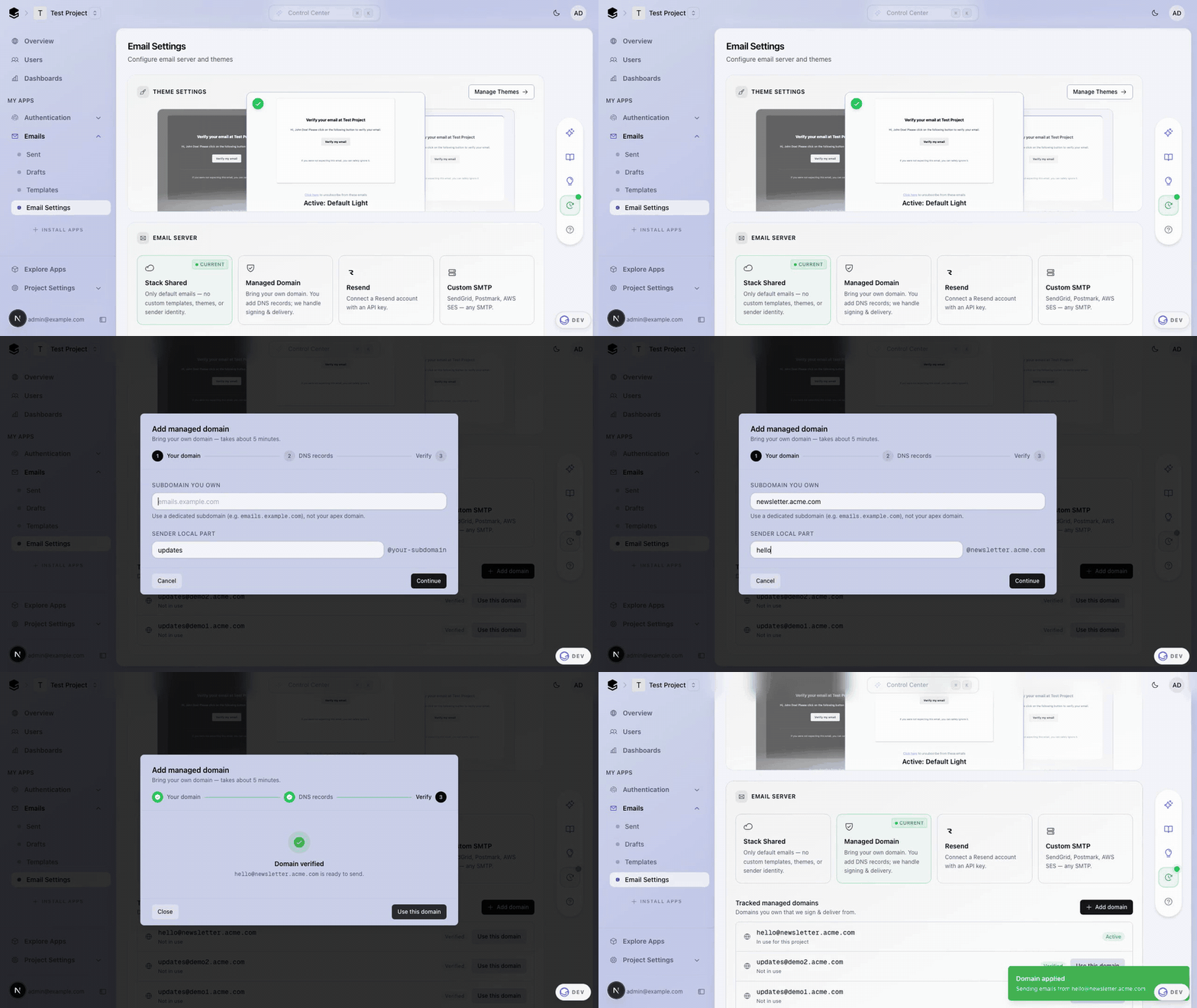 ## Before The saved state was a minimal dropdown, but choosing Custom SMTP / Resend revealed a long conditional form with a hidden gear toggle for server config, no clear "what is saved" signal, and a separate dialog pattern for managed domains. | Saved (Managed) | Custom SMTP selected | |---|---| | 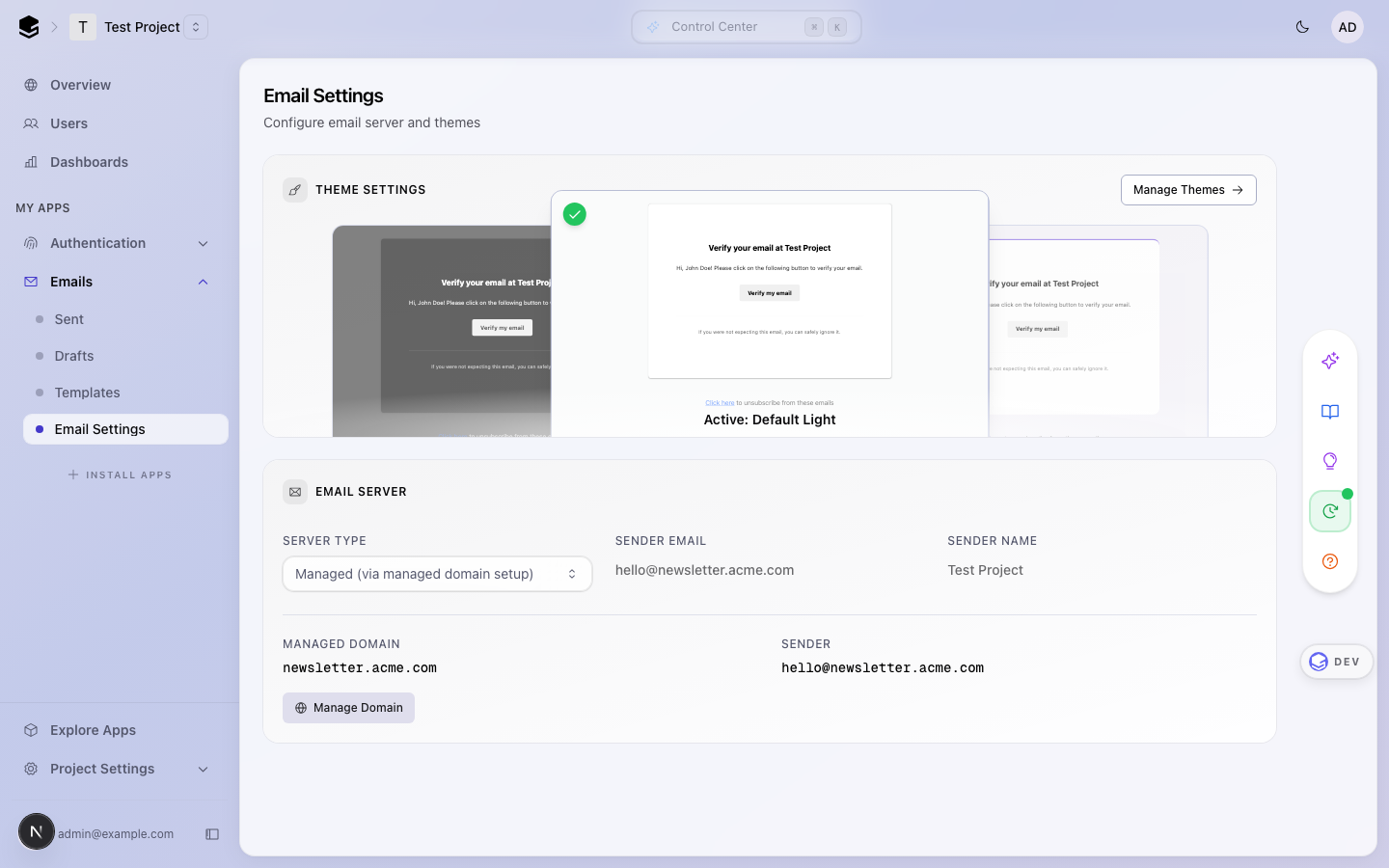 | 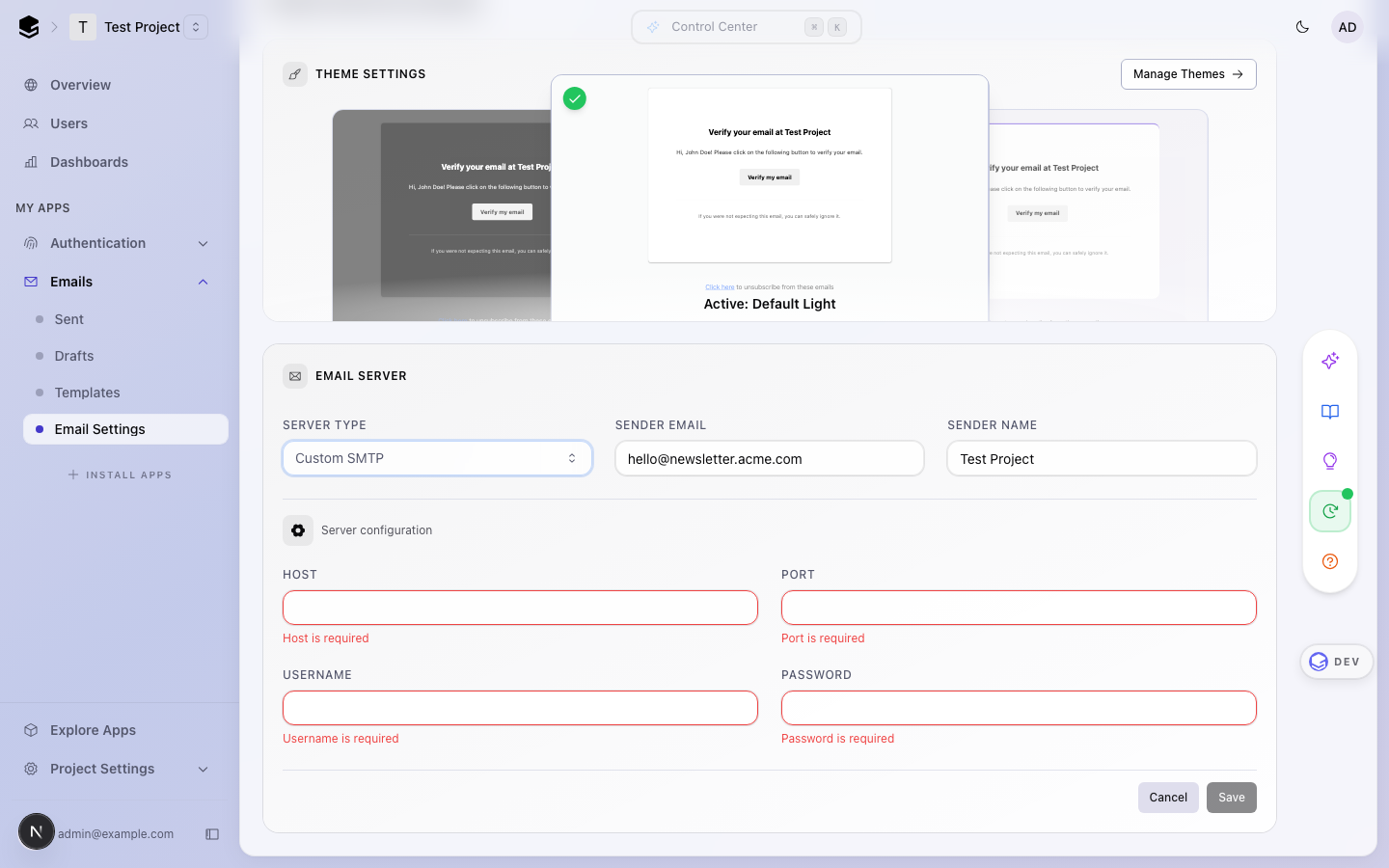 | ## After — Provider cards Four visual cards (Stack Shared, Managed Domain, Resend, Custom SMTP) with updated copy. The saved provider shows a green **Current** pill; the card the user is previewing shows an amber dashed **Draft** pill. An amber unsaved-changes banner appears between the picker and the form when state diverges from saved, so it is unambiguous that a click is not yet committed. | Saved state | Previewing a different provider | |---|---| | 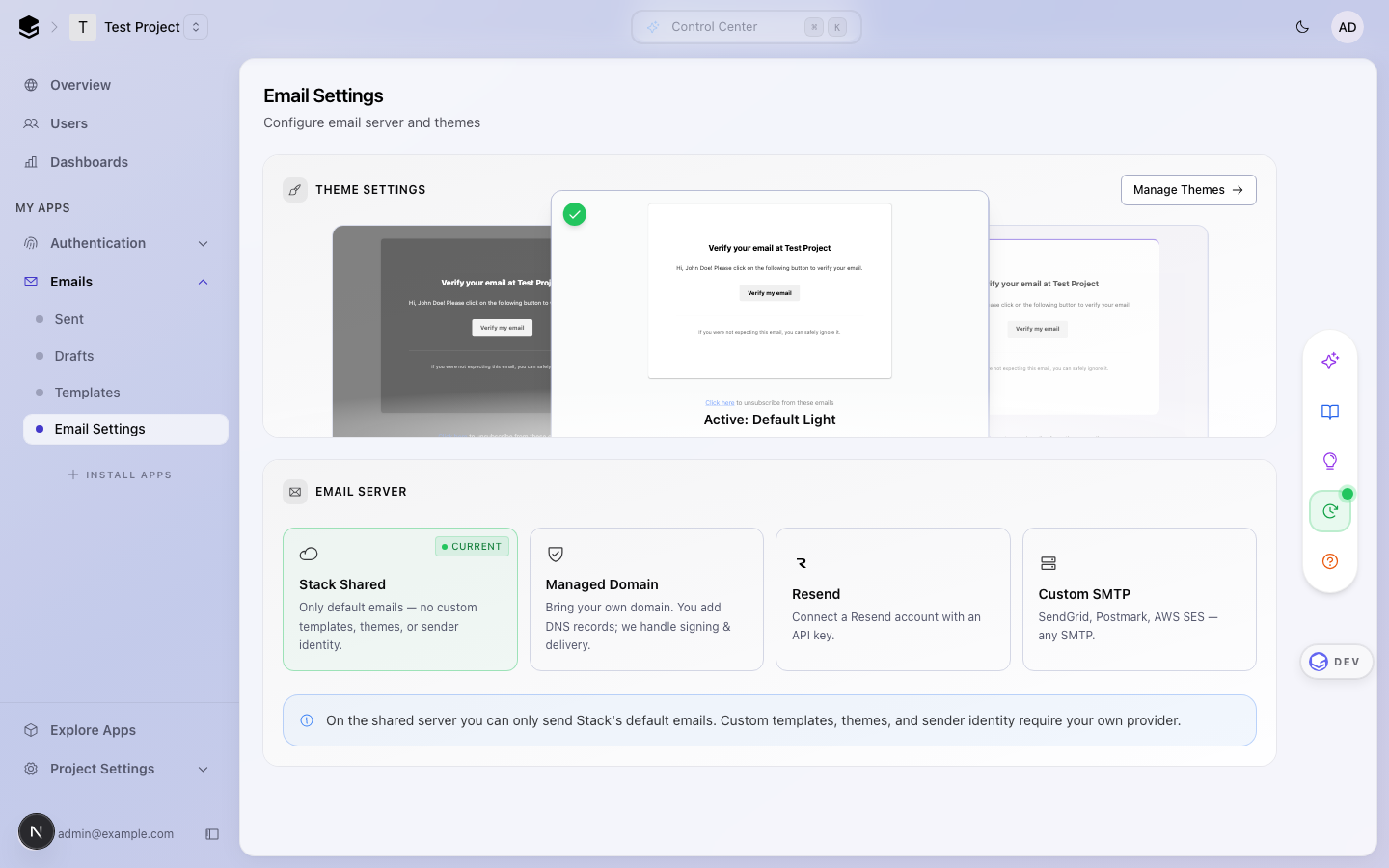 | 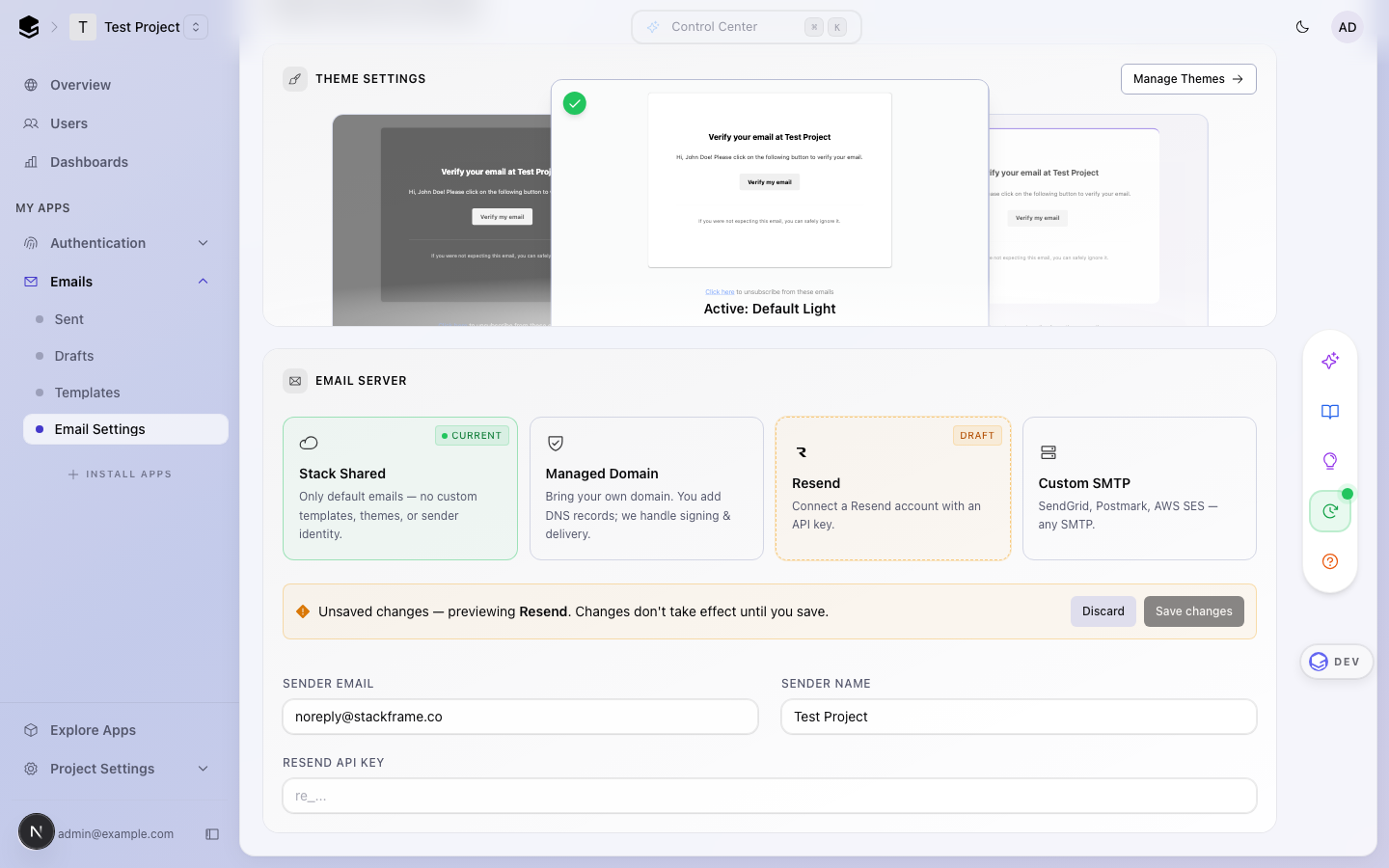 | Copy changes: - **Stack Shared** — "Only default emails — no custom templates, themes, or sender identity." (was: "Shared ([email protected])") - **Managed Domain** — "Bring your own domain. You add DNS records; we handle signing & delivery." (was: "Managed (via managed domain setup)") - **Resend** uses the official Resend brand mark (light/dark variants in `apps/dashboard/public/assets/`) ## After — Managed domain list + stepper dialog Selecting **Managed Domain** immediately shows the tracked-domain list with an **Add domain** button. Each row reflects real status (Active / Verified / Waiting for DNS / Verifying / Failed). Exactly one domain can be **Active** — the one matching the saved email config; every other verified/applied domain shows a **Use this domain** button so switching is always possible. Adding a domain opens a 3-stage dialog with a horizontal stepper (Verify is right-aligned for the final step). Stage 2 replaces the old bare NS-list with a proper **Type / Name / Content** DNS records table with per-row copy buttons. | Tracked domains list | DNS records table | |---|---| | 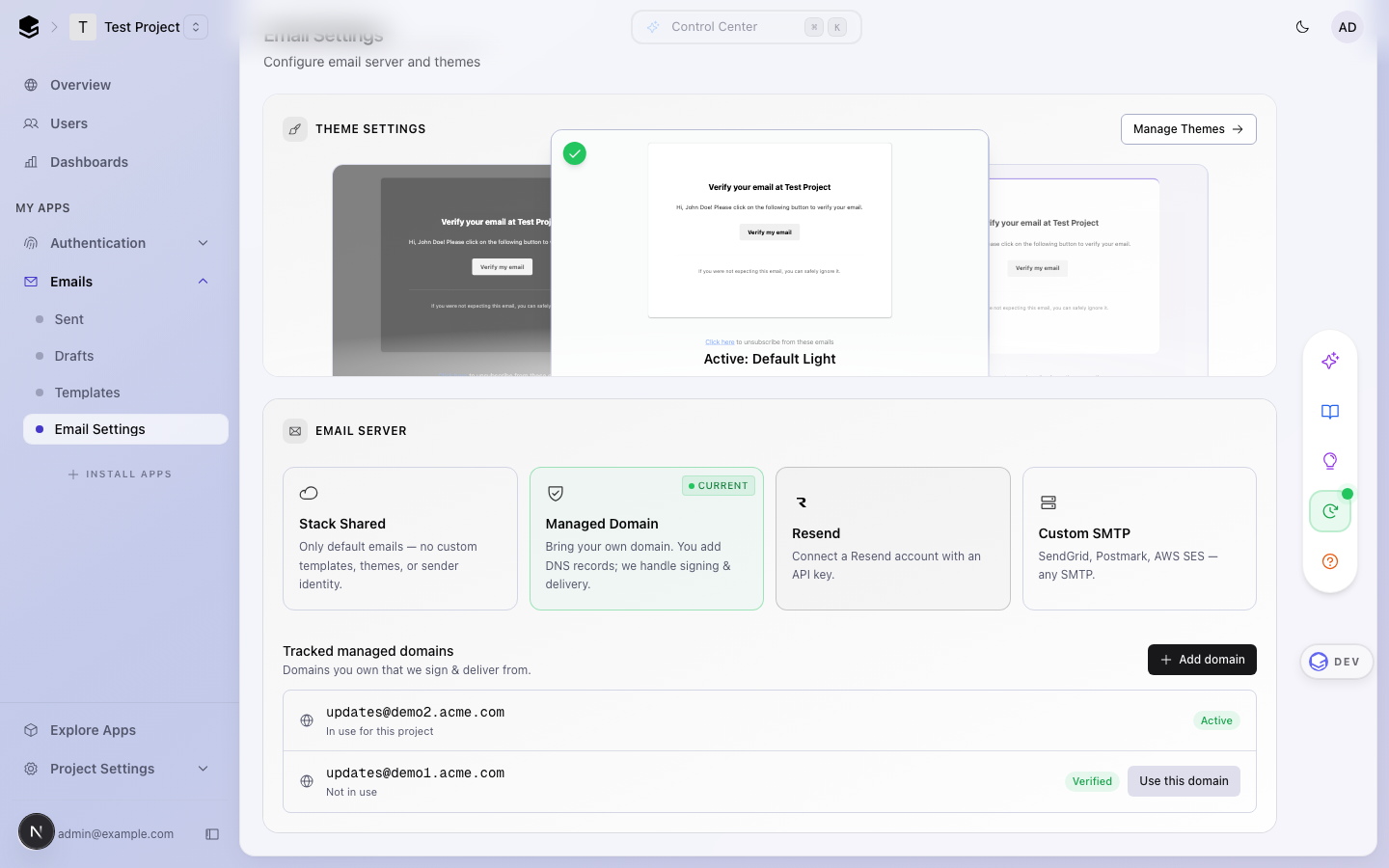 | 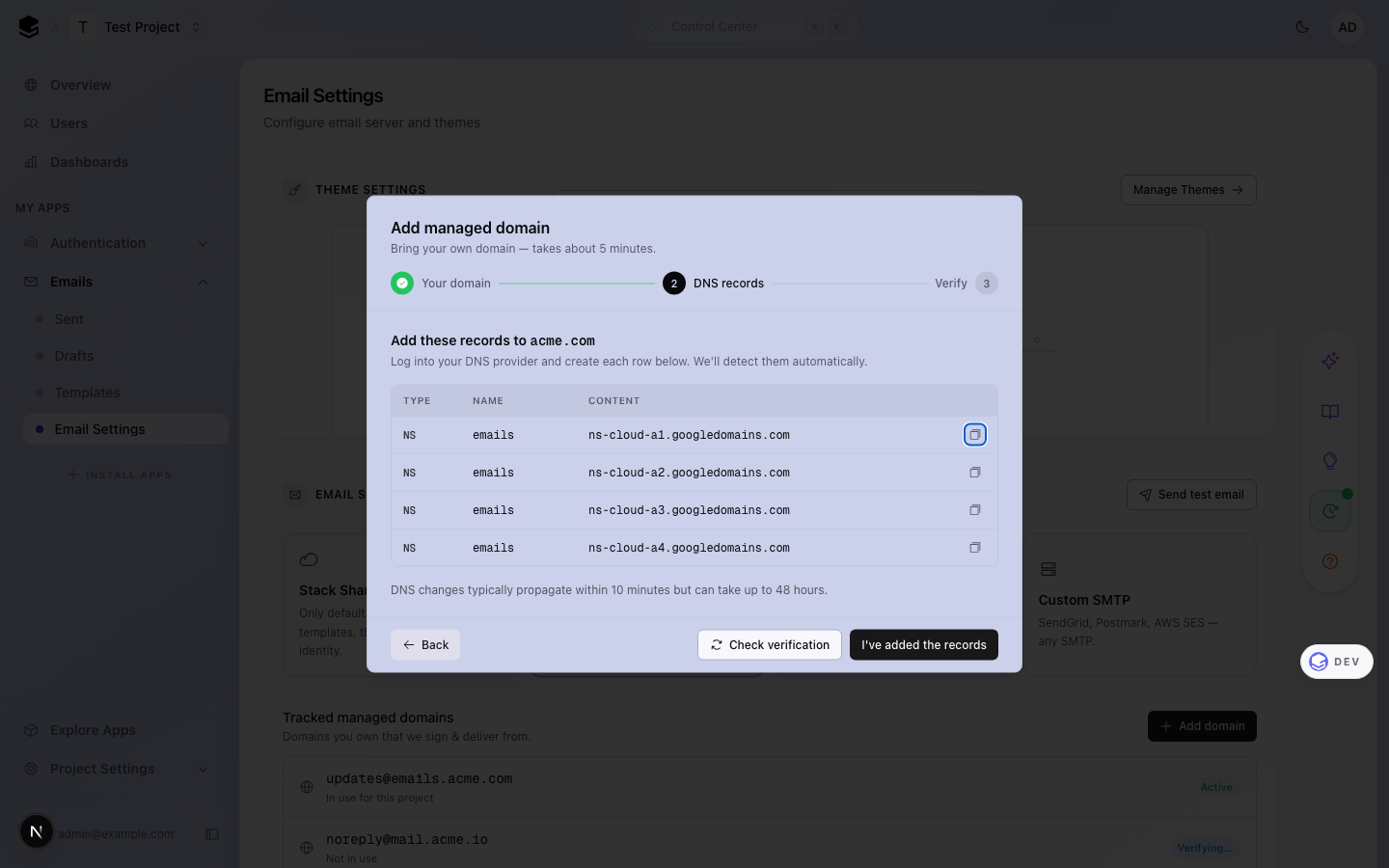 | ## Bug fixes - **Backend: applying a managed domain did not demote previously-applied ones.** Multiple rows could end up with status `APPLIED` even though only one could be in the saved config. New helper `demoteOtherAppliedManagedEmailDomains({ tenancyId, keepId })` runs inside `applyManagedEmailProvider` to demote all other applied rows in the tenancy back to `VERIFIED` before marking the new one. - **Frontend: "Use this domain" only appeared for `status === verified`.** A domain that had been applied then replaced could never be re-applied from the UI. Button now appears for any `verified` or `applied` row that is not currently in use; the **Active** label is derived from config match instead of DB status. - **Dev mock onboarding now mirrors production timing.** `shouldUseMockManagedEmailOnboarding()` used to insert domains as `verified` synchronously. Now the domain is created as `pending_verification`, and a fire-and-forget `runAsynchronously(() => wait(1000))` updates it to `verified` — mirroring the real Resend webhook flow so the UI states (pending → verifying → verified) are exercised in local dev. ## Test plan - [ ] Cards: clicking each card shows `Draft` pill + amber banner; Discard restores; Save commits and flips `Current` to the new card - [ ] Managed: Add domain → stage 1 input → stage 2 DNS table + copy → Check verification flips to stage 3 → Use this domain sets it Active and demotes the previously-active domain in the list - [ ] Managed: clicking **Use this domain** on a non-active verified row makes it Active and the previously-active row back to Verified - [ ] Shared / Resend / SMTP: existing save + test-email flows still work (logic preserved verbatim) - [ ] `pnpm typecheck` (dashboard + backend) and `pnpm lint` pass <!-- This is an auto-generated comment: release notes by coderabbit.ai --> ## Summary by CodeRabbit * **New Features** * Redesigned email domain setup flow with multi-step verification dialog * Added copy-to-clipboard for DNS records * Enhanced provider selection interface with improved visual presentation * Onboarding now shows initial "pending verification" state and completes verification asynchronously * **Bug Fixes** * Ensures only one managed domain becomes active when applying a domain * Improved error handling for email configuration saves * **Tests** * Updated end-to-end tests to reflect async verification timing <!-- end of auto-generated comment: release notes by coderabbit.ai -->emulator-dev-20260424-2f719903 emulator-dev-20260424-d1751a76 |
||
|
promptless[bot]
|
a44a753cb4 | Merge branch 'dev' into promptless/document-developer-tools | ||
|
BilalG1andGitHub
|
d1751a7634 |
fix(init-prompt): require StackProvider for all frameworks (#1374)
## Summary
- The init prompt marked the `StackProvider` step as *React only* and
placed it after the `StackHandler` step. Following it on a Next.js
project produced a layout with no provider, so `StackHandler` crashed at
runtime with `useStackApp must be used within a StackProvider`.
- Make the provider step unconditional and move it ahead of the handler
step so the dependency order matches the instruction order. Also quote
the exact error message so the model won't skip it.

## Test plan
- [ ] Run `npx @stackframe/stack-cli init` (or the web flow) against a
fresh Next.js app and confirm `/handler/[...stack]` renders without the
`useStackApp` error.
- [ ] Re-run against a Vite/React app to confirm the reordered
instructions still produce a working setup.

<!-- This is an auto-generated comment: release notes by coderabbit.ai
-->
## Summary by CodeRabbit

* **Documentation**
* Added explicit global MCP config file path guidance for several coding
agents.
* Documented required provider configuration across supported
frameworks.
* Clarified where to place provider wrappers in root app layouts
(including Next.js app/layout).
* Reordered setup steps to surface the required "Wrap your app in a
Stack provider" step and updated step numbering.
<!-- end of auto-generated comment: release notes by coderabbit.ai -->
emulator-dev-20260424-cbd945e3 |
||
|
promptless[bot]
|
94a29d7587 | Merge branch 'dev' into promptless/document-developer-tools | ||
|
BilalG1andGitHub
|
4a2595d9f7 |
Classify ClickHouse NO_COMMON_TYPE (386) as unsafe (#1380)
## Summary - Add ClickHouse error code `386` (`NO_COMMON_TYPE`) to `UNSAFE_CLICKHOUSE_ERROR_CODES` in `apps/backend/src/lib/clickhouse-errors.ts`. This stops the Sentry `StackAssertionError` (`Unknown Clickhouse error: code 386 not in safe or unsafe codes`) that was firing whenever an admin wrote a query like `SELECT [1, 'a']` or `SELECT if(1, 'a', 1)`, while keeping the raw error message out of prod responses. - Add two e2e regression tests: one against the cross-project `analytics_internal.users` table, and one against `system.query_log`, to pin that 386 is wrapped with the generic `Error during execution of this query.` message in prod (full detail only surfaces in dev/test). ## Why unsafe, not safe Both callers of `getSafeClickhouseErrorMessage` (`apps/backend/src/app/api/latest/internal/analytics/query/route.ts:59` and `apps/backend/src/lib/ai/tools/sql-query.ts:80`) execute caller-authored SQL under `readonly: "1"` with `SQL_project_id`/`SQL_branch_id` scoping. The ClickHouse client runs under a `limited_user` whose grants restrict most tables — but ClickHouse resolves types **before** enforcing ACL. That means a query like `SELECT if(1, query, 1) FROM system.query_log` surfaces code 386 with a message like `There is no supertype for types String, UInt8 ...`, leaking that `system.query_log.query` is a `String` — schema info from a table the caller can't actually read. This is the same type-before-ACL class as code 43 (`ILLEGAL_TYPE_OF_ARGUMENT`), which is already classified unsafe. Classifying 386 as unsafe keeps the defense-in-depth consistent: if per-customer tables are ever introduced and grants don't block reference-resolution in time, 386 won't leak their schema. Cost: in prod, an admin writing a malformed type-mismatch query sees only `Error during execution of this query.` instead of the supertype hint. Dev and test environments still show the full error via the existing `getNodeEnvironment()` branch, so local iteration is unaffected. ## Test plan - [x] `pnpm test run apps/e2e/tests/backend/endpoints/api/v1/analytics-query.test.ts` — all 64 tests pass, including the two 386 regression tests. - [ ] Monitor Sentry after deploy to confirm the `unknown-clickhouse-error-for-query` events for code 386 stop firing. <!-- This is an auto-generated comment: release notes by coderabbit.ai --> ## Summary by CodeRabbit * **Bug Fixes** * Improved handling of a ClickHouse type-mismatch error to prevent exposure of sensitive data and ensure sanitized error responses. * **Tests** * Added regression tests that verify error responses are sanitized, return consistent error codes, and include expected headers without leaking internal details. <!-- end of auto-generated comment: release notes by coderabbit.ai --> |
||
|
promptless[bot]
|
622cfb1f95 | Merge branch 'dev' into promptless/document-developer-tools | ||
|
MantraandGitHub
|
cbd945e3a6 |
[codex] Fix Neon malformed Basic auth validation (#1381)
## What changed

This fixes Sentry issue
[STACK-BACKEND-1A3](https://stackframe-pw.sentry.io/issues/7436639623/?project=4507442898272256&query=is%3Aunresolved&referrer=issue-stream&seerDrawer=true).

A request with this malformed header:

```http
Authorization: Basic
```

used to crash the Neon auth validator with a `StackAssertionError`,
which turned a bad client request into a 500.

The fix makes `neonAuthorizationHeaderSchema` only validate Neon client
credentials after the Basic auth header successfully decodes. If
decoding fails, the Neon-specific validator returns `true` and lets
`basicAuthorizationHeaderSchema` produce the intended 400 schema error:
`Authorization header must be in the format "Basic <base64>"`.

## Reviewer walkthrough

There are two checks chained together:

1. `basicAuthorizationHeaderSchema` checks that the header is
structurally valid Basic auth.
2. `neonAuthorizationHeaderSchema` checks that the decoded
`client_id:client_secret` matches a configured Neon client.

Yup may still run the second check after the first one has failed,
because route validation collects errors with `abortEarly: false`. The
old code assumed the first check had already passed and called
`throwErr(...)` when decoding returned `null`. This PR changes that path
to return `true`, because the format error is already owned by the first
check.

## Tests

- `pnpm -C packages/stack-shared exec vitest run --maxWorkers=1
--minWorkers=1 src/schema-fields.ts`
- `pnpm -C apps/e2e exec vitest run --maxWorkers=1 --minWorkers=1
tests/backend/endpoints/api/v1/integrations/neon/projects/transfer.test.ts
-t "malformed"`
- `pnpm -C packages/stack-shared lint`
- `pnpm -C packages/stack-shared typecheck`
- `pnpm -C apps/e2e lint`
- `pnpm -C apps/e2e typecheck`

<!-- This is an auto-generated comment: release notes by coderabbit.ai
-->

## Summary by CodeRabbit

* **Bug Fixes**
* Enhanced authorization header validation in API endpoints with
improved error handling, ensuring malformed credentials return clear,
specific validation error messages.

* **Tests**
* Added comprehensive end-to-end test coverage for API request
validation, including edge cases for authorization headers.

<!-- end of auto-generated comment: release notes by coderabbit.ai -->
emulator-dev-20260424-7957de41 |
||
|
promptless[bot]
|
7e384569f0 | Merge branch 'dev' into promptless/document-developer-tools | ||
|
MantraandGitHub
|
a132dd23f9 |
fix: refresh-token P2025 race with concurrent sign-out (#1372)
## Summary - Fixes Sentry [STACK-BACKEND-146](https://stackframe-pw.sentry.io/issues/7377768662/): `PrismaClientKnownRequestError` P2025 on `projectUserRefreshToken.update()` during token refresh. - Root cause: `generateAccessTokenFromRefreshTokenIfValid` (`apps/backend/src/lib/tokens.tsx`) reads the refresh-token row upstream, then issues `.update(...)` on it (and on `projectUser`) inside a `Promise.all`. If a concurrent sign-out (`DELETE /auth/sessions/current`), session revoke, password change, or user deletion removes the row between the read and the update, Prisma throws P2025 and the refresh endpoint 500s. ## Changes - `apps/backend/src/lib/tokens.tsx` — swap the two `.update(...)`s for `.updateMany(...)` so a missing row is a no-op, then re-check the refresh token still exists; return `null` if it doesn't. The refresh route already maps `null` -> `KnownErrors.RefreshTokenNotFoundOrExpired` (401), which is the correct user-facing behavior for a just-revoked session. - `apps/backend/src/oauth/model.tsx` — in `generateAccessToken`, replace the "ultra-rare race condition" `throwErr` fallback with `throw new KnownErrors.RefreshTokenNotFoundOrExpired()` so concurrent sign-out during an OAuth `refresh_token` grant returns a clean 401 instead of 500. - `apps/e2e/tests/backend/endpoints/api/v1/auth/sessions/current/refresh-race.test.ts` — new regression test that fires `POST /auth/sessions/current/refresh` and `DELETE /auth/sessions/current` concurrently with the same refresh token. Before the fix it 500s on the first iteration; after, it passes in ~12s. ## Test plan - [x] New regression test passes locally. - [x] Existing `auth/sessions/**` + `auth/oauth/token.test.ts` still pass (27 tests, 3 todo, 0 failed). - [ ] CI green. <!-- This is an auto-generated comment: release notes by coderabbit.ai --> ## Summary by CodeRabbit * **Bug Fixes** * Refresh flows now detect a revoked or removed refresh token during concurrent operations and stop cleanly, preventing issuance of an access token from stale data. * A specific refresh-token-not-found/expired error is returned instead of a generic failure when refresh cannot proceed. * **Tests** * Added E2E tests exercising concurrent refresh vs sign-out to prevent race-condition crashes and validate safe handling of competing requests. <!-- end of auto-generated comment: release notes by coderabbit.ai --> |
||
|
promptless[bot]
|
20b178ce80 | Merge branch 'dev' into promptless/document-developer-tools | ||

|
982b8fb2d9 |
Simplify sign-up rules tester dialog (#1369)
## Summary
The sign-up rules tester dialog was dense and hard to parse: a
two-column layout crammed 8 input fields against 4 stacked result panels
(Outcome, Triggered rules, Evaluation trace, Normalized context), and
used technical jargon ("Turnstile override", "Normalized context",
"Evaluation trace") without much hierarchy. This PR reworks it around
the user's actual question — *"will this sign-up be allowed?"* — and
moves the entrypoint somewhere more discoverable.
## What changed
### 1. Dialog UI — essentials-first layout
- Only **Email** and **Sign-up method** are shown upfront.
- Everything else (OAuth provider, Country, Bot / free-trial-abuse
scores, Turnstile) is hidden behind a single **Advanced options**
collapsible panel. The label previews what's inside, so users know when
they need to expand it.
- Results are outcome-first: a large green/red hero card with a check/X
icon and a plain-English decision ("Sign-up would be allowed"). Matched
rules and resolved context are tucked into `<details>` sections below.
- Removed the "Fill out the form above…" placeholder — it added clutter
without adding info.
### 2. Loading → result transition
- The outcome card now mounts **immediately** when Run test is clicked.
While the request is in flight it shows a neutral gray card with a
spinning `CircleNotchIcon` and "Running test…".
- When the result arrives, the card's border/background transitions over
500ms to green or red, the spinner fades out, and the check/X fades in.
Matched rules and resolved context slide down underneath via a
`grid-rows-[0fr→1fr]` animation.
### 3. Entry-point moved to the page header
- "Open tester" now sits **next to Add rule** in the header (secondary
variant, same size).
- Removed the dedicated "Test rules" card at the bottom of the page — it
was using real estate for something a button can do.
### 4. Code cleanup
- Dropped three exploratory variants (wizard, inspector, the original
complex card) that were temporarily in the file during design
exploration.
- Extracted `useTestRulesState()` to encapsulate state + API call, so
the card is purely presentational.
## Why
The tester is an admin-only debugging tool, so it lives or dies by how
fast someone can glance at it and answer *"would this sign-up go
through?"*. The old dialog asked readers to visually parse two columns
and seven fields just to find the outcome. The new layout answers that
question in the first card.
## Walkthrough

21s demo (2x speed): page → open tester → type email → Run test →
loading spinner transitions into the green decision card.
[Download
MP4](https://gist.githubusercontent.com/BilalG1/67639d1590ac172880dc705a027560d3/raw/tester-flow.mp4)
· [Gist with all
media](https://gist.github.com/BilalG1/67639d1590ac172880dc705a027560d3)
## Before / After
### Original tester

### New header layout
"Open tester" next to "Add rule"; no more bottom card.

### New tester dialog — initial
Just Email + Sign-up method. Advanced options collapsed.

### New tester dialog — mid-run (loading)
Outcome card mounts with a spinner while the request is in-flight.

### New tester dialog — result
Outcome hero transitions to green; matched rules + resolved context
collapsibles underneath.

## Test plan
- [x] `pnpm typecheck` (dashboard) passes
- [x] `pnpm lint` (dashboard) passes
- [x] Manually exercised the tester against a configured rule
(`emailDomain.endsWith("tempmail.com")`) with Advanced options both open
and closed
- [x] Verified the loading → green/red transition under artificial
latency (1.2s)
- [x] Verified the "Open tester" button sits next to "Add rule" and the
bottom card is gone
## Scope notes
- No backend, schema, or API changes. Only touches
`apps/dashboard/src/app/(main)/(protected)/projects/[projectId]/sign-up-rules/page-client.tsx`.
- The existing analytics / trigger-history / rule-editor code is
untouched.
<!-- This is an auto-generated comment: release notes by coderabbit.ai
-->
## Summary by CodeRabbit
## Release Notes
* **New Features**
* Advanced testing options now available in a collapsible panel
* Enhanced test results visualization with detailed rule evaluation
display
* **UI/UX Improvements**
* Test trigger button relocated to main action area
* Larger, repositioned "Run test" button
* Reorganized results display with collapsible sections for rules and
context details
<!-- end of auto-generated comment: release notes by coderabbit.ai -->
---------
Co-authored-by: Bilal Godil <[email protected]>
|
||
|
promptless[bot]
|
a2d92a55e8 | Merge branch 'dev' into promptless/document-developer-tools | ||
|
MantraandGitHub
|
7957de4182 |
fix(email-queue): recover stuck sending without duplicate retry (#1356)
## Summary Email outbox rows can get stuck in `SENDING` if a worker dies after setting `startedSendingAt` but before finishing or unclaiming. This change adds `recoverEmailsStuckInSending`, which runs each email queue step and marks rows past the stuck timeout as **terminal server errors** with delivery status unknown, **without** scheduling an automatic retry (to avoid duplicate sends if the provider already accepted the message). ## Changes - **`recoverEmailsStuckInSending`**: updates stuck rows with `finishedSendingAt`, `canHaveDeliveryInfo: false`, and server error fields; emits Sentry via `captureError` when any rows are recovered. - **Tests**: `email-queue-step.test.tsx` covers recovery of old `startedSendingAt`, no-op for recent sends, and idempotency (second pass does not re-queue). ## Test plan - [ ] `pnpm` / vitest for `apps/backend/src/lib/email-queue-step.test.tsx` (requires dev DB like other integration tests in this package) Made with [Cursor](https://cursor.com) <!-- This is an auto-generated comment: release notes by coderabbit.ai --> ## Summary by CodeRabbit * **Bug Fixes** * Email reliability: messages that remained stuck in sending are now automatically marked as terminal failures, assigned standardized error details, cleared from retry scheduling, prevented from receiving delivery info, and recovery emits an alert only when actual work occurs. Recovery is safe to run repeatedly (idempotent). * **Tests** * Added integration tests validating recovery behavior, proper field updates, and idempotency. <!-- end of auto-generated comment: release notes by coderabbit.ai --> |
||
|
promptless[bot]
|
aaabd25d99 | Merge branch 'dev' into promptless/document-developer-tools | ||
|
Bilal Godil
|
37e70ca1ae | rotate stack cli publishable client key emulator-dev-20260423-37e70ca1 emulator-dev-20260423-94541c4a | ||
|
promptless[bot]
|
bd514d8463 | Merge branch 'dev' into promptless/document-developer-tools | ||
|
BilalG1andGitHub
|
94541c4a94 |
fix(dashboard): Restricted row styling + Replays empty state (#1366)
## Summary Two small UI polish fixes in `apps/dashboard`: 1. **User detail page** — the **Restricted** field now visually matches its sibling fields (`User ID`, `Display name`, `Primary email`, etc.) by reusing the same input-box appearance (`rounded-xl` border, ring, shadow, `h-8`). Previously it rendered as a bare button with `rounded-md` hover styling, which looked out of place in the user details grid. 2. **Analytics → Replays page** — the empty state previously read just *"No session replays yet"* with no guidance. It now shows a short description of what session replays are, and links out to the docs (`https://docs.stack-auth.com/docs/apps/analytics`) so new users can discover more. ## Files changed - [`apps/dashboard/src/app/(main)/(protected)/projects/[projectId]/users/[userId]/page-client.tsx`](https://github.com/stack-auth/stack-auth/blob/fix/ui-bugs-users-analytics/apps/dashboard/src/app/%28main%29/%28protected%29/projects/%5BprojectId%5D/users/%5BuserId%5D/page-client.tsx) — `RestrictedStatusRow` button now styled to mirror the read-only `EditableInput` look. - [`apps/dashboard/src/app/(main)/(protected)/projects/[projectId]/analytics/replays/page-client.tsx`](https://github.com/stack-auth/stack-auth/blob/fix/ui-bugs-users-analytics/apps/dashboard/src/app/%28main%29/%28protected%29/projects/%5BprojectId%5D/analytics/replays/page-client.tsx) — empty state now includes a description and a `StyledLink` to the docs. --- ## Bug 1 — Restricted row no longer visually orphaned Before, the *Restricted* row's value (`No`) was just plain text inside the grid; every other row (User ID, Display name, Primary email, Password, 2-factor auth, Signed up at, Risk scores, Sign-up country code) was rendered inside a styled input box. After the fix, *Restricted* uses the same boxed style — the row is still clickable and still opens the existing restriction dialog. ### Before / after toggle (full page)  ### Cropped view of the changed region (clearer)  ### Wipe transition  ### Fade transition  ### Pixel diff (only the Restricted cell changes)  --- ## Bug 2 — Replays empty state explains itself Before, an empty replays workspace showed only *"No session replays yet"*. Users had no signal that there is anything they need to do, or where to look. After the fix, the empty state explains what session replays are, hints that replays will appear once captured, and links to the relevant docs page. > Session replays let you watch how users interact with your app. Replays will appear here once your project starts capturing them. > > [Learn more in the docs](https://docs.stack-auth.com/docs/apps/analytics) ### Before / after toggle (full page)  ### Cropped view of the empty state  ### Wipe transition  ### Fade transition  ### Pixel diff  --- ## Test plan - [x] `pnpm --filter @stackframe/dashboard run lint` passes - [x] `pnpm --filter @stackframe/dashboard run typecheck` passes - [x] Manual verification on `localhost:8101`: - [x] User detail page renders Restricted with the same input-box style as siblings - [x] Clicking Restricted still opens the existing restriction dialog - [x] Replays empty state shows description + working docs link - [x] Light mode visually verified (dark mode untouched, classes are dark-mode-aware) ## Notes for reviewers - No change to `RestrictionDialog`, `getRestrictionReasonText`, or any restriction logic — this is purely visual. - The replays empty-state copy keeps the existing `MonitorPlayIcon` and centered layout; only added the description paragraph and the `StyledLink` (which is already imported in this file). - Comparison assets (toggles / fades / wipes / pixel diffs) are hosted in [this gist](https://gist.github.com/BilalG1/eb9ca0eeec88357728127fd4d759fa17) for reference. <!-- This is an auto-generated comment: release notes by coderabbit.ai --> ## Summary by CodeRabbit * **Style** * Improved analytics empty state: centered, constrained layout; clearer primary text, added muted secondary explanatory copy and an external documentation link that opens in a new tab. * Restyled restricted-user control: refreshed appearance and spacing, truncation for long values, and stronger hover/focus feedback while preserving existing behavior. <!-- end of auto-generated comment: release notes by coderabbit.ai -->emulator-dev-20260423-a22d5a49 |
||
|
promptless[bot]
|
1972d298e8 | Merge branch 'dev' into promptless/document-developer-tools | ||
|
BilalG1andGitHub
|
0532a18c36 |
fix(dashboard): wrap "Block new purchases" toggle in a Card (#1364)
## Summary The **Block new purchases** toggle on the Payments → Settings page was visually out of place: it rendered as a bare `SettingSwitch` outside the `max-w-3xl` settings column, while every neighboring setting (Stripe Connection, Test Mode, Payment Methods, Platform-Managed Methods) was a full-width `Card`. This PR wraps it in a `Card` that matches the existing `TestModeToggle` pattern so it inherits the same width constraint, border, padding, title/description structure, and state-colored icon badge. **File changed:** [`apps/dashboard/src/app/(main)/(protected)/projects/[projectId]/payments/settings/page-client.tsx`](https://github.com/stack-auth/stack-auth/blob/fix/payments-block-new-purchases-card/apps/dashboard/src/app/(main)/(protected)/projects/%5BprojectId%5D/payments/settings/page-client.tsx) ## What was wrong Two concrete mismatches with the rest of the page: 1. **Wrong container.** The `SettingSwitch` was a direct child of `<PageLayout>` rather than the `<div className="space-y-6 max-w-3xl">` column that wraps the other settings — so it stretched to the full page width instead of the 3xl column and broke the vertical rhythm (no consistent `space-y-6` gap from the card above). 2. **Wrong style primitive.** It used the bare `SettingSwitch` row component instead of a `Card` + `CardHeader`/`CardTitle`/`CardDescription`/`CardContent` structure — so there was no border, no heading hierarchy, and no state-colored icon badge, which every other setting on the page has. ## Fix - Moved the block inside the `space-y-6 max-w-3xl` column so it's constrained and spaced like its siblings. - Replaced the `SettingSwitch` with a `Card` mirroring `TestModeToggle`: - `CardHeader` with `CardTitle` (\"Block New Purchases\") and `CardDescription` (\"Stops new checkouts while keeping existing subscriptions active.\"). - `CardContent` with an icon badge (`ProhibitIcon`) that turns red when blocking is active, plus a short \"Block new purchases\" label and the `Switch`. - Copy is intentionally minimal: one title, one sentence of description, one label next to the switch. No two-state narration. ## Visual comparison ### Pixel diff (changed pixels tinted red over the after image) 4.7% of pixels changed, all concentrated in the bottom of the settings column — everything else is pixel-identical, confirming the fix is scoped.  ### Cropped before/after toggle (zoomed to the changed region) Full-viewport comparisons are noisy when the delta is a single component at the bottom. This one is cropped to the changed bbox so the card fix is the whole frame — 1s before, 1s after, looped.  ### Wipe reveal (before on the left, after swept in from the left) A vertical red sweeps across the full page, revealing the after state over the before state. Useful for spotting any unintended drift elsewhere on the page (there is none).  ## Test plan - [ ] Open `/projects/<id>/payments/settings` in the dashboard. - [ ] Verify \"Block New Purchases\" renders as a `Card` with the same width as Stripe Connection / Test Mode / Payment Methods. - [ ] Toggle the switch on — icon badge turns red, config write fires (`payments.blockNewPurchases = true`, `pushable: true`). - [ ] Toggle off — icon returns to muted gray, config write fires with `false`. - [ ] Reload the page and confirm the persisted state matches the toggle. - [ ] `pnpm lint` and `pnpm typecheck` pass. <!-- This is an auto-generated comment: release notes by coderabbit.ai --> ## Summary by CodeRabbit * **Improvements** * Redesigned the "Block New Purchases" toggle in payment settings with a new card-based interface and visual prohibit indicator for improved clarity and user experience. <!-- end of auto-generated comment: release notes by coderabbit.ai --> |
||
|
BilalG1andGitHub
|
4f198bd55b |
Fix dashboard UI bugs: webhook detail crash and http domain silent https upgrade (#1362)
## Summary
Fixes two dashboard UI bugs surfaced while auditing the project area for
large user-visible issues:
1. **Webhook detail page completely broken** — the page shows a blank
screen because the SvixProvider token was being set to the string
`"[object Object]"`.
2. **Editing a trusted domain with an `http://` base URL silently
upgrades it to `https://`** — saving the edit dialog without changing
anything changes the protocol, breaking callbacks to the original host.
Both are corrected with minimal, targeted changes in the dashboard app.
No API, schema, or shared package changes are required.
---
## Bug 1 — Webhook detail page crashes because `svixToken + ''` yields
`"[object Object]"`
### Where
`apps/dashboard/src/app/(main)/(protected)/projects/[projectId]/webhooks/[endpointId]/page-client.tsx`
### Root cause
`stackAdminApp.useSvixToken()` returns an object of shape `{ token:
string, url: string | null }` (see
`packages/template/src/lib/stack-app/apps/implementations/admin-app-impl.ts`).
The page was doing:
```ts
const svixToken = stackAdminApp.useSvixToken();
const [updateCounter, setUpdateCounter] = useState(0);
// This is a hack to make sure svix hooks update when content changes
const svixTokenUpdated = useMemo(() => {
return svixToken + '';
}, [svixToken, updateCounter]);
// …
<SvixProvider token={svixTokenUpdated} …>
```
`svixToken + ''` coerces the object to the string `"[object Object]"`,
which is then passed to `<SvixProvider>` as the auth token. Every nested
Svix hook (`useEndpoint`, `useEndpointSecret`,
`useEndpointMessageAttempts`) authenticates with that bogus token, gets
a `401 {"code":"authentication_failed","detail":"Invalid token"}` from
Svix, and `getSvixResult`
(`apps/dashboard/src/app/(main)/(protected)/projects/[projectId]/webhooks/utils.tsx`)
throws, crashing the page.
Additional notes while in there:
- `setUpdateCounter` was declared but never called anywhere, so the
surrounding `useMemo`/`useState` was dead weight as well as broken.
Removing it removes the dead code too.
- The neighbouring list page (`webhooks/page-client.tsx`) already uses
the correct shape (`svixToken.token`, `svixToken.url`), which is why the
list page rendered correctly while the detail page didn't.
### Fix
Pass `svixToken.token` directly to `<SvixProvider>` and drop the unused
counter/memo.
```ts
export default function PageClient(props: { endpointId: string }) {
const stackAdminApp = useAdminApp();
const svixToken = stackAdminApp.useSvixToken();
return (
<AppEnabledGuard appId="webhooks">
<SvixProvider
token={svixToken.token}
appId={stackAdminApp.projectId}
options={{ serverUrl: getPublicEnvVar('NEXT_PUBLIC_STACK_SVIX_SERVER_URL') }}
>
<PageInner endpointId={props.endpointId} />
</SvixProvider>
</AppEnabledGuard>
);
}
```
### Reproduction (before fix)
1. Enable the Webhooks app on a project.
2. Create an endpoint with any URL.
3. Open the row's action menu and click **View Details**.
4. The page renders blank (Svix hooks throw 401 Invalid token; the error
boundary unmounts the detail tree). URL, Description, Verification
Secret, and Events History never appear.
### Before / After
| Before | After |
| --- | --- |
| 
| 
|
---
## Bug 2 — Editing an `http://` trusted domain silently upgrades it to
`https://`
### Where
`apps/dashboard/src/app/(main)/(protected)/projects/[projectId]/domains/page-client.tsx`
### Root cause
In `EditDialog`, the form's `defaultValues` always set `insecureHttp:
false`, regardless of the protocol of the domain being edited:
```ts
defaultValues={{
addWww: props.type === 'create',
domain: props.type === 'update' ? props.defaultDomain.replace(/^https?:\/\//, "") : undefined,
handlerPath: props.type === 'update' ? props.defaultHandlerPath : "/handler",
insecureHttp: false, // ← ignores the existing protocol
}}
```
The `domain` field strips `http(s)://` for display but the protocol
itself is only tracked through the `insecureHttp` switch, which lives
inside the collapsed-by-default **Advanced** accordion. On submit:
```ts
const protocol = values.insecureHttp ? 'http://' : 'https://';
const baseUrl = protocol + values.domain;
```
So an `http://myapp.test` entry reopens with `insecureHttp: false`, the
Advanced section stays collapsed, the user sees nothing wrong, and
hitting **Save** (even with zero visible changes) writes
`https://myapp.test` back to config. Existing redirects from SSO / email
verification flows that depend on the original `http://` host stop
working.
### Fix
Derive `insecureHttp` from the existing `defaultDomain` when editing:
```ts
insecureHttp: props.type === 'update' ? props.defaultDomain.startsWith('http://') : false,
```
This makes the switch in the Advanced panel pre-check itself correctly
and the submit path emits the preserved protocol.
### Reproduction (before fix)
1. Go to **Project Settings → Trusted Domains**.
2. Add a new domain, expand **Advanced**, toggle **Use HTTP instead of
HTTPS** on, enter `myapp.test`, click **Create**. The list now shows
`http://myapp.test`.
3. Click the row's **⋯ → Edit**, then **Save** without changing
anything.
4. Observe the list now shows `https://myapp.test`.
### Before / After
**Domain list after an edit+save:**
| Before (http silently became https) | After (http preserved) |
| --- | --- |
| 
| 
|
In the "before" screenshot, `http://myapp.test` was edited with no
changes and silently became `https://myapp.test`.
`http://www.myapp.test` (not edited) stayed `http://`, confirming the
bug is triggered only through the edit-save path.
**Edit dialog (Advanced expanded):**
| Before (HTTP switch always off) | After (reflects stored protocol) |
| --- | --- |
| 
| 
|
The "after" dialog also shows the protocol prefix label flip from
`https://` to `http://` next to the input — a second visual cue that the
user is editing an HTTP domain.
---
## Scope / out of scope
In scope here:
- The two fixes above, plus a small amount of dead-code cleanup adjacent
to the first fix (the unused `updateCounter` / `useMemo` hack).
Intentionally **not** included (tracked separately from the same audit —
see internal notes):
- Cursor pagination cache wipe across Users/Teams/Transactions tables
(`data-table/common/cursor-pagination.tsx`)
- Email Outbox "Scheduled At" input being reset on every keystroke and
rendered in the wrong timezone (`email-outbox/page-client.tsx`)
- Latent empty-group handling in the sign-up rule builder (validator +
CEL emitter), which is real in code but not currently reachable through
the editor UI
These are broader and deserve their own PRs.
## Test plan
- [ ] **Bug 1 (webhook detail):** Enable Webhooks on a project, create
an endpoint, open **View Details**. Confirm URL, Description,
Verification Secret, and Events History render (no 401s in the console,
no blank page). Confirm the Copy button on the verification secret still
copies the key.
- [ ] **Bug 2 (domain edit preserves http):** Add an `http://` trusted
domain. Edit it and save with no changes — list should still show
`http://`. Edit again, flip the Advanced switch to HTTPS, save — list
should show `https://`. Repeat with the inverse direction (start https,
flip to http).
- [ ] **Regression sweep:** Webhooks list page, create/delete endpoint,
copy signing secret; Trusted Domains add/delete; auth-methods callbacks
against an `http://localhost` domain continue to work.
- [ ] `pnpm typecheck` passes locally. (`pnpm lint` was also run against
the dashboard app and is clean.)
<!-- This is an auto-generated comment: release notes by coderabbit.ai
-->
## Summary by CodeRabbit
* **Bug Fixes**
* Domain editing now correctly initializes and preserves the protocol
type (HTTP or HTTPS) based on the existing domain configuration.
<!-- end of auto-generated comment: release notes by coderabbit.ai -->
|
||
|
BilalG1andGitHub
|
a22d5a49c1 |
Reduce Jaeger memory usage in local dev (#1357)
## Summary Jaeger's `all-in-one` image uses an unbounded in-memory span store by default, so on long-running local dev sessions it quietly grows until the Docker VM is under memory pressure. This caps it in two ways: - `MEMORY_MAX_TRACES=50000` — tells Jaeger to evict old traces once the in-memory ring buffer hits 50k. Plenty for local debugging without retaining every trace forever. - `mem_limit: 1g` — hard Docker memory cap as a backstop so a runaway collector can't starve the rest of the compose stack (Postgres, ClickHouse, Svix, etc.). Only touches `docker/dependencies/docker.compose.yaml` — no app code, no prod config. ## Test plan - [ ] `docker compose -f docker/dependencies/docker.compose.yaml up jaeger` starts cleanly - [ ] Jaeger UI reachable at `localhost:8107` - [ ] OTLP endpoint on `localhost:8131` still ingests spans from the API/dashboard - [ ] `docker stats` shows the jaeger container capped at ~1GB under load - [ ] Old traces get evicted once trace count exceeds 50k (verify via UI search) <!-- This is an auto-generated comment: release notes by coderabbit.ai --> ## Summary by CodeRabbit ## Release Notes * **Chores** * Configured memory constraints and trace buffering optimization for the tracing service to improve resource management and system stability. <!-- end of auto-generated comment: release notes by coderabbit.ai --> |
||
|
promptless[bot]
|
e625fe2077 | Merge branch 'dev' into promptless/document-developer-tools | ||
|
MantraandGitHub
|
000634607a |
fix(internal-tool): continue dev startup when spacetime publish fails (#1371)
## Summary
- pre-dev.mjs now warns and exits 0 when the local SpacetimeDB publish
fails, instead of aborting `next dev`
- Lets contributors without a running local SpacetimeDB server still
start the internal-tool dev server
- Updates the header comment to reflect the new behavior

## Test plan
- [ ] Run `pnpm dev` in `apps/internal-tool` with no SpacetimeDB server
running — dev server should still start, with a warning
- [ ] Run with SpacetimeDB server running and `spacetime` CLI installed
— publish still runs and dev proceeds
- [ ] Run without `spacetime` CLI installed — existing warn-and-continue
path still works

<!-- This is an auto-generated comment: release notes by coderabbit.ai
-->
## Summary by CodeRabbit

* **Chores**
* Updated local publishing configuration to derive server settings from
environment variables for improved flexibility and easier customization.
<!-- end of auto-generated comment: release notes by coderabbit.ai -->
emulator-dev-20260422-00063460 |
||
|
promptless[bot]
|
a4ffe8d771 |
Merge branch 'dev' into promptless/document-developer-tools
DB migration compat / Check if migrations changed (push) Has been cancelled
DB migration compat / Back-compat — Current branch migrations with ${{ needs.check-migrations-changed.outputs.base_branch }} branch code (push) Has been cancelled
DB migration compat / Forward-compat — Current branch code with ${{ needs.check-migrations-changed.outputs.base_branch }} branch migrations (push) Has been cancelled
DB migration compat / No migration changes (skipped) (push) Has been cancelled
|











