mirror of
https://github.com/ellermister/mtproxy.git
synced 2026-06-13 21:02:35 +08:00

1.8 KiB
1.8 KiB
mtproxy
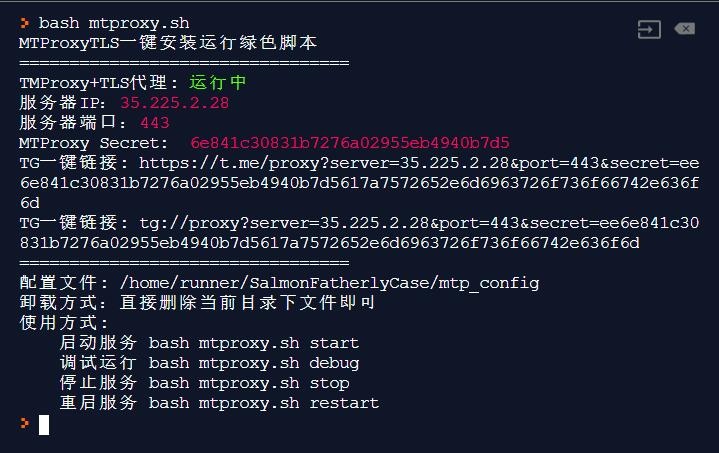
MTProxyTLS one-click install script
Discussion
Telegram Group: https://t.me/EllerHK
Install
Execute the following code to install
mkdir /home/mtproxy && cd /home/mtproxy
curl -s -o mtproxy.sh https://raw.githubusercontent.com/ellermister/mtproxy/master/mtproxy.sh && chmod +x mtproxy.sh && bash mtproxy.sh
Whitelist MTProxy Docker Image
The image integrates nginx and mtproxy+tls to disguise traffic, and uses a white-list mode to deal with firewall detection.
If you use this Docker image, you don't need to use the script, you can choose one of the two, don't mix it up.
secret=$(head -c 16 /dev/urandom | xxd -ps)
domain="cloudflare.com"
docker run --name nginx-mtproxy -d -e secret="$secret" -e domain="$domain" -p 8080:80 -p 8443:443 ellermister/nginx-mtproxy:latest
The image enabled the IP segment whitelist by default. If you don't need it, you can cancel it:
docker run --name nginx-mtproxy -d -e secret="$secret" -e domain="$domain" -e ip_white_list="IP" -p 8080:80 -p 8443:443 ellermister/nginx-mtproxy:latest
For more usage: https://hub.docker.com/r/ellermister/nginx-mtproxy
Usage
Start service
bash mtproxy.sh start
Debug service
bash mtproxy.sh debug
Stop service
bash mtproxy.sh stop
Restart service
bash mtproxy.sh restart
Uninstall
Just delete the directory where it is located.
rm -rf /home/mtproxy
Run on Startup
Edit /etc/rc.local and add the following code to the script:
cd /home/mtproxy && bash mtproxy.sh start > /dev/null 2>&1 &