

# mtproxy
A one-click installation automation script for MTProxy, designed for Telegram client connections. The script supports Fake TLS and AdTag configuration by default.
Additionally, it provides Nginx as a frontend proxy and MTProxy as a backend proxy to achieve secure traffic disguise. IP whitelist is configured at the Nginx forwarding layer, allowing only whitelisted IPs to access the service.
> Docker images are provided for out-of-the-box usage.
## Community
Telegram Group:
## Installation Methods
Two installation methods are available:
- **Script Installation** (Recommended for Debian/Ubuntu)
This method requires direct installation or compilation on your host machine, which may require installing some basic system dependency libraries.
- **Docker Installation** (Any system that supports Docker)
**Beginners are recommended to use Docker!** It won't pollute your host system. If you need to modify configuration files, you'll need to learn some basic Docker usage.
### Script Installation
> If you repeatedly encounter errors or other unknown issues, it is recommended to switch to a Debian 9+ system or use Docker instead.
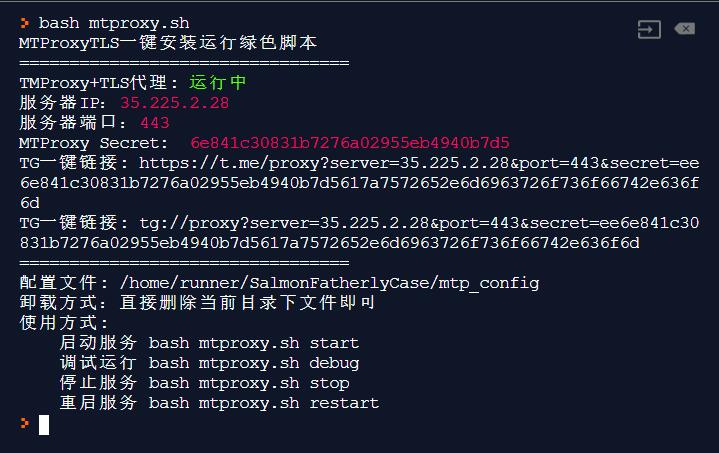
Execute the following commands to install:
```bash
rm -rf /home/mtproxy && mkdir /home/mtproxy && cd /home/mtproxy
curl -fsSL -o mtproxy.sh https://github.com/ellermister/mtproxy/raw/master/mtproxy.sh
bash mtproxy.sh
```
### Docker | Whitelist MTProxy Docker Image
This image integrates nginx and mtproxy+tls to disguise traffic, and uses **whitelist** mode to deal with firewall detection.
**If you use this Docker image, you don't need to use the script anymore. Choose one of the two methods, don't mix them up.**
**If Docker is not installed**, use the following one-click installation:
```bash
curl -fsSL https://get.docker.com -o get-docker.sh
sh get-docker.sh
```
**Create container with whitelist:**
```bash
docker run -d \
--name mtproxy \
--restart=always \
-e domain="cloudflare.com" \
-p 8080:80 \
-p 8443:443 \
ellermister/mtproxy
```
**The image enables IP segment whitelist by default.**
If you don't need it, you can disable it by setting `ip_white_list="OFF"`:
```bash
docker run -d \
--name mtproxy \
--restart=always \
-e domain="cloudflare.com" \
-e secret="548593a9c0688f4f7d9d57377897d964" \
-e ip_white_list="OFF" \
-p 8080:80 \
-p 8443:443 \
ellermister/mtproxy
```
`ip_white_list` options:
- **OFF** - Disable whitelist
- **IP** - Enable IP whitelist
- **IPSEG** - Enable IP segment whitelist
`secret`: If you want to create a known secret key, the format should be: 32 hexadecimal characters.
**View link configuration parameters in logs:**
```bash
docker logs -f mtproxy
```
Remember to change the connection port to your mapped external port. In the examples above, the port is `8443`. Modify the port when connecting.
For more usage, please refer to:
## Usage
Configuration file is `config`. If you want to manually modify the secret or parameters, please pay attention to the format.
Start service
```bash
bash mtproxy.sh start
```
Debug mode
```bash
bash mtproxy.sh debug
```
Stop service
```bash
bash mtproxy.sh stop
```
Restart service
```bash
bash mtproxy.sh restart
```
Reinstall/Reconfigure
```bash
bash mtproxy.sh reinstall
```
## Uninstall
Since it's a portable version, uninstallation is extremely simple - just delete the directory.
```bash
rm -rf /home/mtproxy
```
## Run on Startup
> This script is not configured as a system service. You can add it to your startup script.
For the startup script, if your `rc.local` file doesn't exist, please check your startup service.
Edit the file `/etc/rc.local` and add the following code to the startup script:
```bash
cd /home/mtproxy && bash mtproxy.sh start > /dev/null 2>&1 &
```
## Crontab Daemon
Due to bugs in the official mtproxy program, there are issues with process handling when the PID exceeds 65535, causing the process to become unresponsive and exit abnormally.
Therefore, it is recommended to monitor the process through scheduled tasks `crontab -e`:
Check and start the process every minute
```bash
* * * * * cd /home/mtproxy && bash mtproxy.sh start > /dev/null 2>&1 &
```
## MTProxy Admin Bot
> Sorry, an error has occurred during your request. Please try again later.(Code xxxxxx)
If you encounter such an error when applying to bind proxy promotion, the official has not given a clear reason. According to user feedback, such problems mostly occur with accounts registered for less than 2-3 years.
**It is recommended to use accounts that are more than 3 years old and accounts that have not been banned.**
## References
-
-
-