 6a2f8ecc7b
MiniMax provides an OpenAI-compatible API, making integration straightforward. This adds: - MiniMax model wrapper class (OpenAI-compatible) - Model token mappings for MiniMax-M1, M2, and M2.5 models - Provider routing in abstract_graph factory - README update listing MiniMax as a supported provider |
||
|---|---|---|
| .github | ||
| docs | ||
| examples | ||
| PullRequests | ||
| scrapegraphai | ||
| tests | ||
| .gitattributes | ||
| .gitignore | ||
| .pre-commit-config.yaml | ||
| .readthedocs.yaml | ||
| .releaserc.yml | ||
| .semantic-commits-applied | ||
| CHANGELOG.md | ||
| citation.cff | ||
| CODE_OF_CONDUCT.md | ||
| codebeaver.yml | ||
| CONTRIBUTING.md | ||
| docker-compose.yml | ||
| Dockerfile | ||
| LICENSE | ||
| Makefile | ||
| pyproject.toml | ||
| pytest.ini | ||
| README.md | ||
| readthedocs.yml | ||
| requirements-dev.txt | ||
| requirements.txt | ||
| SECURITY.md | ||
| SEMANTIC_COMMITS.md | ||
| test | ||
| TESTING_INFRASTRUCTURE.md | ||
| uv.lock | ||
🚀 Looking for an even faster and simpler way to scrape at scale (only 5 lines of code)? Check out our enhanced version at ScrapeGraphAI.com! 🚀
🕷️ ScrapeGraphAI: You Only Scrape Once
English | 中文 | 日本語 | 한국어 | Русский | Türkçe | Deutsch | Español | français | Português






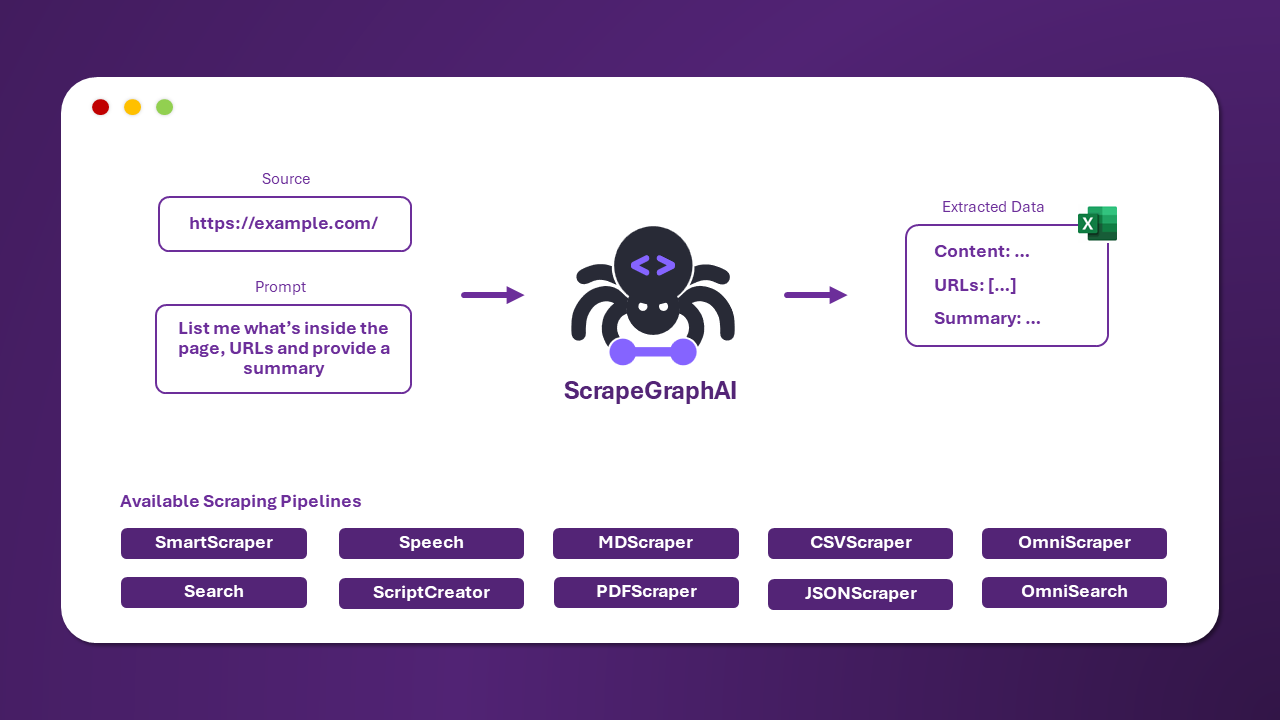
ScrapeGraphAI is a web scraping python library that uses LLM and direct graph logic to create scraping pipelines for websites and local documents (XML, HTML, JSON, Markdown, etc.).
Just say which information you want to extract and the library will do it for you!
🚀 Integrations
ScrapeGraphAI offers seamless integration with popular frameworks and tools to enhance your scraping capabilities. Whether you're building with Python or Node.js, using LLM frameworks, or working with no-code platforms, we've got you covered with our comprehensive integration options..
You can find more informations at the following link
Integrations:
- API: Documentation
- SDKs: Python, Node
- LLM Frameworks: Langchain, Llama Index, Crew.ai, Agno, CamelAI
- Low-code Frameworks: Pipedream, Bubble, Zapier, n8n, Dify, Toolhouse
- MCP server: Link
🚀 Quick install
The reference page for Scrapegraph-ai is available on the official page of PyPI: pypi.
pip install scrapegraphai

# IMPORTANT (for fetching websites content)
playwright install
Note: it is recommended to install the library in a virtual environment to avoid conflicts with other libraries 🐱
💻 Usage
There are multiple standard scraping pipelines that can be used to extract information from a website (or local file).
The most common one is the SmartScraperGraph, which extracts information from a single page given a user prompt and a source URL.
from scrapegraphai.graphs import SmartScraperGraph

# Define the configuration for the scraping pipeline
graph_config = {
    "llm": {
        "model": "ollama/llama3.2",
        "model_tokens": 8192,
        "format": "json",
    },
    "verbose": True,
    "headless": False,
}

# Create the SmartScraperGraph instance
smart_scraper_graph = SmartScraperGraph(
    prompt="Extract useful information from the webpage, including a description of what the company does, founders and social media links",
    source="https://scrapegraphai.com/",
    config=graph_config
)

# Run the pipeline
result = smart_scraper_graph.run()

import json
print(json.dumps(result, indent=4))
Note
For OpenAI and other models you just need to change the llm config!
graph_config = {
   "llm": {
       "api_key": "YOUR_OPENAI_API_KEY",
       "model": "openai/gpt-4o-mini",
   },
   "verbose": True,
   "headless": False,
}
The output will be a dictionary like the following:
{
    "description": "ScrapeGraphAI transforms websites into clean, organized data for AI agents and data analytics. It offers an AI-powered API for effortless and cost-effective data extraction.",
    "founders": [
        {
            "name": "",
            "role": "Founder & Technical Lead",
            "linkedin": "https://www.linkedin.com/in/perinim/"
        },
        {
            "name": "Marco Vinciguerra",
            "role": "Founder & Software Engineer",
            "linkedin": "https://www.linkedin.com/in/marco-vinciguerra-7ba365242/"
        },
        {
            "name": "Lorenzo Padoan",
            "role": "Founder & Product Engineer",
            "linkedin": "https://www.linkedin.com/in/lorenzo-padoan-4521a2154/"
        }
    ],
    "social_media_links": {
        "linkedin": "https://www.linkedin.com/company/101881123",
        "twitter": "https://x.com/scrapegraphai",
        "github": "https://github.com/ScrapeGraphAI/Scrapegraph-ai"
    }
}
There are other pipelines that can be used to extract information from multiple pages, generate Python scripts, or even generate audio files.
| Pipeline Name | Description |
|---|---|
| SmartScraperGraph | Single-page scraper that only needs a user prompt and an input source. |
| SearchGraph | Multi-page scraper that extracts information from the top n search results of a search engine. |
| SpeechGraph | Single-page scraper that extracts information from a website and generates an audio file. |
| ScriptCreatorGraph | Single-page scraper that extracts information from a website and generates a Python script. |
| SmartScraperMultiGraph | Multi-page scraper that extracts information from multiple pages given a single prompt and a list of sources. |
| ScriptCreatorMultiGraph | Multi-page scraper that generates a Python script for extracting information from multiple pages and sources. |
For each of these graphs there is the multi version. It allows to make calls of the LLM in parallel.
It is possible to use different LLM through APIs, such as OpenAI, Groq, Azure, Gemini, MiniMax and more, or local models using Ollama.
Remember to have Ollama installed and download the models using the ollama pull command, if you want to use local models.
📖 Documentation

The documentation for ScrapeGraphAI can be found here. Check out also the Docusaurus here.
🤝 Contributing
Feel free to contribute and join our Discord server to discuss with us improvements and give us suggestions!
Please see the contributing guidelines.
🔗 ScrapeGraph API & SDKs
If you are looking for a quick solution to integrate ScrapeGraph in your system, check out our powerful API here!
We offer SDKs in both Python and Node.js, making it easy to integrate into your projects. Check them out below:
| SDK | Language | GitHub Link |
|---|---|---|
| Python SDK | Python | scrapegraph-py |
| Node.js SDK | Node.js | scrapegraph-js |
The Official API Documentation can be found here.
🔥 Benchmark
According to Firecrawl benchmark Firecrawl benchmark, ScrapeGraph is the best fetcher on the market!

📈 Telemetry
We collect anonymous usage metrics to enhance our package's quality and user experience. The data helps us prioritize improvements and ensure compatibility. If you wish to opt-out, set the environment variable SCRAPEGRAPHAI_TELEMETRY_ENABLED=false. For more information, please refer to the documentation here.
❤️ Contributors
🎓 Citations
If you have used our library for research purposes please quote us with the following reference:
  @misc{scrapegraph-ai,
    author = {Lorenzo Padoan, Marco Vinciguerra},
    title = {Scrapegraph-ai},
    year = {2024},
    url = {https://github.com/VinciGit00/Scrapegraph-ai},
    note = {A Python library for scraping leveraging large language models}
  }
Authors
| Contact Info | |
|---|---|
| Marco Vinciguerra |  |
| Lorenzo Padoan | |
📜 License
ScrapeGraphAI is licensed under the MIT License. See the LICENSE file for more information.
Acknowledgements
- We would like to thank all the contributors to the project and the open-source community for their support.
- ScrapeGraphAI is meant to be used for data exploration and research purposes only. We are not responsible for any misuse of the library.
Made with ❤️ by ScrapeGraph AI
