30 Days Of Python: Day 27 - Python with MongoDB
Author:
Asabeneh Yetayeh
Second Edition: July, 2021
[<< Day 26](../26_Day_Python_web/26_python_web.md) | [Day 28 >>](../28_Day_API/28_API.md)
- [📘 Day 27](#-day-27)
- [Python with MongoDB](#python-with-mongodb)
- [MongoDB](#mongodb)
- [SQL versus NoSQL](#sql-versus-nosql)
- [Getting Connection String(MongoDB URI)](#getting-connection-stringmongodb-uri)
- [Connecting Flask application to MongoDB Cluster](#connecting-flask-application-to-mongodb-cluster)
- [Creating a database and collection](#creating-a-database-and-collection)
- [Inserting many documents to collection](#inserting-many-documents-to-collection)
- [MongoDB Find](#mongodb-find)
- [Find with Query](#find-with-query)
- [Find query with modifier](#find-query-with-modifier)
- [Limiting documents](#limiting-documents)
- [Find with sort](#find-with-sort)
- [Update with query](#update-with-query)
- [Delete Document](#delete-document)
- [Drop a collection](#drop-a-collection)
- [💻 Exercises: Day 27](#-exercises-day-27)
# 📘 Day 27
# Python with MongoDB
Python is a backend technology and it can be connected with different data base applications. It can be connected to both SQL and noSQL databases. In this section, we connect Python with MongoDB database which is noSQL database.
## MongoDB
MongoDB is a NoSQL database. MongoDB stores data in a JSON like document which make MongoDB very flexible and scalable. Let us see the different terminologies of SQL and NoSQL databases. The following table will make the difference between SQL versus NoSQL databases.
### SQL versus NoSQL

In this section, we will focus on a NoSQL database MongoDB. Lets sign up on [mongoDB](https://www.mongodb.com/) by click on the sign in button then click register on the next page.

Complete the fields and click continue

Select the free plan

Choose the proximate free region and give any name for you cluster.

Now, a free sandbox is created

All local host access

Add user and password

Create a mongoDB uri link

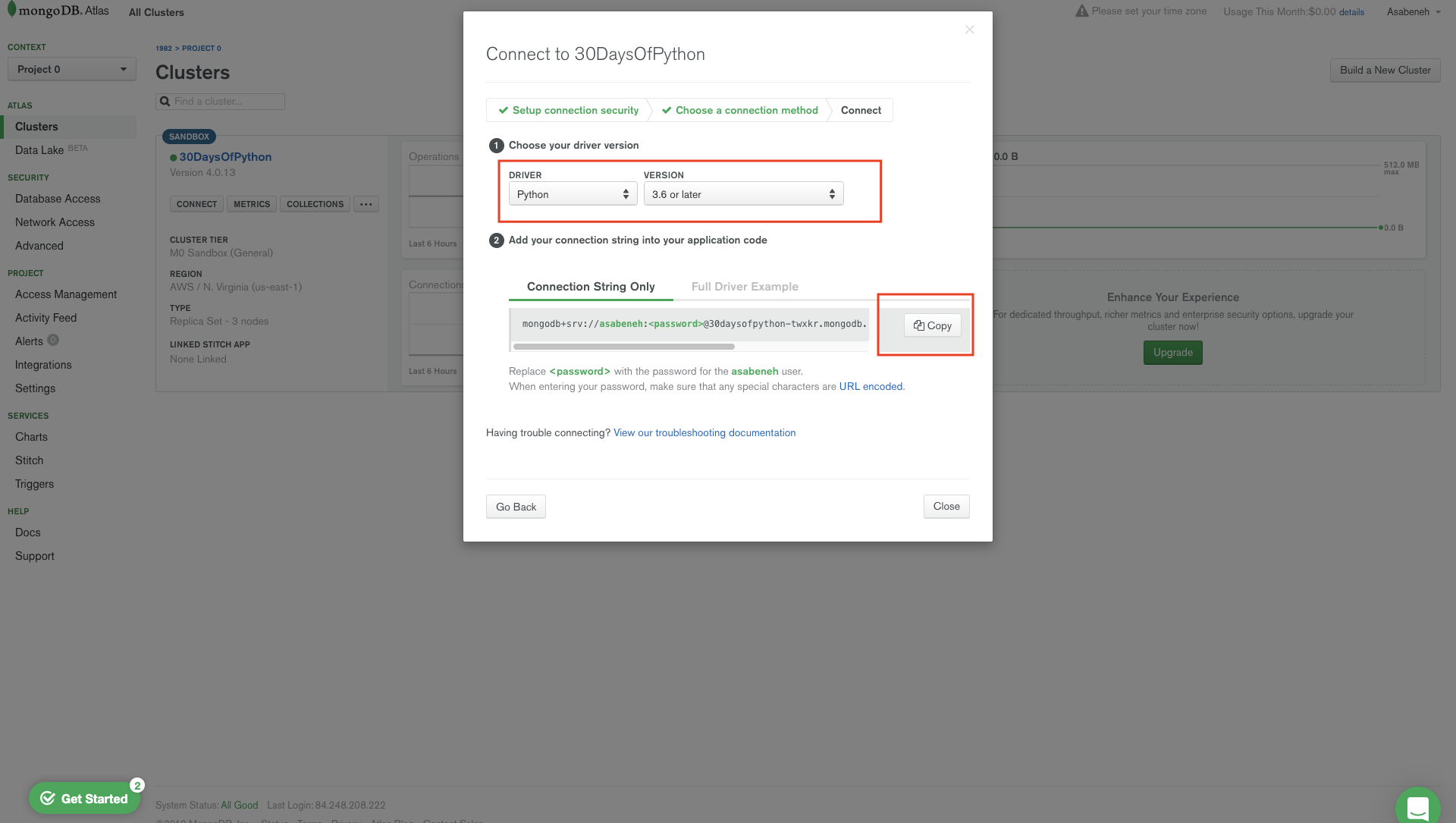
Select Python 3.6 or above driver
### Getting Connection String(MongoDB URI)
Copy the connection string link and you will get something like this:
```sh
mongodb+srv://asabeneh:@30daysofpython-twxkr.mongodb.net/test?retryWrites=true&w=majority
```
Do not worry about the url, it is a means to connect your application with mongoDB.
Let us replace the password placeholder with the password you used to add a user.
**Example:**
```sh
mongodb+srv://asabeneh:123123123@30daysofpython-twxkr.mongodb.net/test?retryWrites=true&w=majority
```
Now, I replaced everything and the password is 123123 and the name of the database is *thirty_days_python*. This is just an example, your password must be stronger than the example password.
Python needs a mongoDB driver to access mongoDB database. We will use _pymongo_ with _dnspython_ to connect our application with mongoDB base . Inside your project directory install pymongo and dnspython.
```sh
pip install pymongo dnspython
```
The "dnspython" module must be installed to use mongodb+srv:// URIs. The dnspython is a DNS toolkit for Python. It supports almost all record types.
### Connecting Flask application to MongoDB Cluster
```py
# let's import the flask
from flask import Flask, render_template
import os # importing operating system module
MONGODB_URI = 'mongodb+srv://asabeneh:your_password_goes_here@30daysofpython-twxkr.mongodb.net/test?retryWrites=true&w=majority'
client = pymongo.MongoClient(MONGODB_URI)
print(client.list_database_names())
app = Flask(__name__)
if __name__ == '__main__':
# for deployment we use the environ
# to make it work for both production and development
port = int(os.environ.get("PORT", 5000))
app.run(debug=True, host='0.0.0.0', port=port)
```
When we run the above code we get the default mongoDB databases.
```sh
['admin', 'local']
```
### Creating a database and collection
Let us create a database, database and collection in mongoDB will be created if it doesn't exist. Let's create a data base name *thirty_days_of_python* and *students* collection.
To create a database:
```sh
db = client.name_of_databse # we can create a database like this or the second way
db = client['name_of_database']
```
```py
# let's import the flask
from flask import Flask, render_template
import os # importing operating system module
MONGODB_URI = 'mongodb+srv://asabeneh:your_password_goes_here@30daysofpython-twxkr.mongodb.net/test?retryWrites=true&w=majority'
client = pymongo.MongoClient(MONGODB_URI)
# Creating database
db = client.thirty_days_of_python
# Creating students collection and inserting a document
db.students.insert_one({'name': 'Asabeneh', 'country': 'Finland', 'city': 'Helsinki', 'age': 250})
print(client.list_database_names())
app = Flask(__name__)
if __name__ == '__main__':
# for deployment we use the environ
# to make it work for both production and development
port = int(os.environ.get("PORT", 5000))
app.run(debug=True, host='0.0.0.0', port=port)
```
After we create a database, we also created a students collection and we used *insert_one()* method to insert a document.
Now, the database *thirty_days_of_python* and *students* collection have been created and the document has been inserted.
Check your mongoDB cluster and you will see both the database and the collection. Inside the collection, there will be a document.
```sh
['thirty_days_of_python', 'admin', 'local']
```
If you see this on the mongoDB cluster, it means you have successfully created a database and a collection.

If you have seen on the figure, the document has been created with a long id which acts as a primary key. Every time we create a document mongoDB create and unique id for it.
### Inserting many documents to collection
The *insert_one()* method inserts one item at a time if we want to insert many documents at once either we use *insert_many()* method or for loop.
We can use for loop to inset many documents at once.
```py
# let's import the flask
from flask import Flask, render_template
import os # importing operating system module
MONGODB_URI = 'mongodb+srv://asabeneh:your_password_goes_here@30daysofpython-twxkr.mongodb.net/test?retryWrites=true&w=majority'
client = pymongo.MongoClient(MONGODB_URI)
students = [
{'name':'David','country':'UK','city':'London','age':34},
{'name':'John','country':'Sweden','city':'Stockholm','age':28},
{'name':'Sami','country':'Finland','city':'Helsinki','age':25},
]
for student in students:
db.students.insert_one(student)
app = Flask(__name__)
if __name__ == '__main__':
# for deployment we use the environ
# to make it work for both production and development
port = int(os.environ.get("PORT", 5000))
app.run(debug=True, host='0.0.0.0', port=port)
```
### MongoDB Find
The *find()* and *findOne()* methods are common method to find data in a collection in mongoDB database. It is similar to the SELECT statement in a MySQL database.
Let us use the _find_one()_ method to get a document in a database collection.
- \*find_one({"\_id": ObjectId("id"}): Gets the first occurrence if an id is not provided
```py
# let's import the flask
from flask import Flask, render_template
import os # importing operating system module
MONGODB_URI = 'mongodb+srv://asabeneh:your_password_goes_here@30daysofpython-twxkr.mongodb.net/test?retryWrites=true&w=majority'
client = pymongo.MongoClient(MONGODB_URI)
db = client['thirty_days_of_python'] # accessing the database
student = db.students.find_one()
print(student)
app = Flask(__name__)
if __name__ == '__main__':
# for deployment we use the environ
# to make it work for both production and development
port = int(os.environ.get("PORT", 5000))
app.run(debug=True, host='0.0.0.0', port=port)
```
```sh
{'_id': ObjectId('5df68a21f106fe2d315bbc8b'), 'name': 'Asabeneh', 'country': 'Helsinki', 'city': 'Helsinki', 'age': 250}
```
The above query returns the first entry but we can target specific document using specific \_id. Let us do one example, use David's id to get David object.
'\_id':ObjectId('5df68a23f106fe2d315bbc8c')
```py
# let's import the flask
from flask import Flask, render_template
import os # importing operating system module
from bson.objectid import ObjectId # id object
MONGODB_URI = 'mongodb+srv://asabeneh:your_password_goes_here@30daysofpython-twxkr.mongodb.net/test?retryWrites=true&w=majority'
client = pymongo.MongoClient(MONGODB_URI)
db = client['thirty_days_of_python'] # accessing the database
student = db.students.find_one({'_id':ObjectId('5df68a23f106fe2d315bbc8c')})
print(student)
app = Flask(__name__)
if __name__ == '__main__':
# for deployment we use the environ
# to make it work for both production and development
port = int(os.environ.get("PORT", 5000))
app.run(debug=True, host='0.0.0.0', port=port)
```
```sh
{'_id': ObjectId('5df68a23f106fe2d315bbc8c'), 'name': 'David', 'country': 'UK', 'city': 'London', 'age': 34}
```
We have seen, how to use _find_one()_ using the above examples. Let's move one to _find()_
- _find()_: returns all the occurrence from a collection if we don't pass a query object. The object is pymongo.cursor object.
```py
# let's import the flask
from flask import Flask, render_template
import os # importing operating system module
MONGODB_URI = 'mongodb+srv://asabeneh:your_password_goes_here@30daysofpython-twxkr.mongodb.net/test?retryWrites=true&w=majority'
client = pymongo.MongoClient(MONGODB_URI)
db = client['thirty_days_of_python'] # accessing the database
students = db.students.find()
for student in students:
print(student)
app = Flask(__name__)
if __name__ == '__main__':
# for deployment we use the environ
# to make it work for both production and development
port = int(os.environ.get("PORT", 5000))
app.run(debug=True, host='0.0.0.0', port=port)
```
```sh
{'_id': ObjectId('5df68a21f106fe2d315bbc8b'), 'name': 'Asabeneh', 'country': 'Finland', 'city': 'Helsinki', 'age': 250}
{'_id': ObjectId('5df68a23f106fe2d315bbc8c'), 'name': 'David', 'country': 'UK', 'city': 'London', 'age': 34}
{'_id': ObjectId('5df68a23f106fe2d315bbc8d'), 'name': 'John', 'country': 'Sweden', 'city': 'Stockholm', 'age': 28}
{'_id': ObjectId('5df68a23f106fe2d315bbc8e'), 'name': 'Sami', 'country': 'Finland', 'city': 'Helsinki', 'age': 25}
```
We can specify which fields to return by passing second object in the _find({}, {})_. 0 means not include and 1 means include but we can not mix 0 and 1, except for \_id.
```py
# let's import the flask
from flask import Flask, render_template
import os # importing operating system module
MONGODB_URI = 'mongodb+srv://asabeneh:your_password_goes_here@30daysofpython-twxkr.mongodb.net/test?retryWrites=true&w=majority'
client = pymongo.MongoClient(MONGODB_URI)
db = client['thirty_days_of_python'] # accessing the database
students = db.students.find({}, {"_id":0, "name": 1, "country":1}) # 0 means not include and 1 means include
for student in students:
print(student)
app = Flask(__name__)
if __name__ == '__main__':
# for deployment we use the environ
# to make it work for both production and development
port = int(os.environ.get("PORT", 5000))
app.run(debug=True, host='0.0.0.0', port=port)
```
```sh
{'name': 'Asabeneh', 'country': 'Finland'}
{'name': 'David', 'country': 'UK'}
{'name': 'John', 'country': 'Sweden'}
{'name': 'Sami', 'country': 'Finland'}
```
### Find with Query
In mongoDB find take a query object. We can pass a query object and we can filter the documents we like to filter out.
```py
# let's import the flask
from flask import Flask, render_template
import os # importing operating system module
MONGODB_URI = 'mongodb+srv://asabeneh:your_password_goes_here@30daysofpython-twxkr.mongodb.net/test?retryWrites=true&w=majority'
client = pymongo.MongoClient(MONGODB_URI)
db = client['thirty_days_of_python'] # accessing the database
query = {
"country":"Finland"
}
students = db.students.find(query)
for student in students:
print(student)
app = Flask(__name__)
if __name__ == '__main__':
# for deployment we use the environ
# to make it work for both production and development
port = int(os.environ.get("PORT", 5000))
app.run(debug=True, host='0.0.0.0', port=port)
```
```sh
{'_id': ObjectId('5df68a21f106fe2d315bbc8b'), 'name': 'Asabeneh', 'country': 'Finland', 'city': 'Helsinki', 'age': 250}
{'_id': ObjectId('5df68a23f106fe2d315bbc8e'), 'name': 'Sami', 'country': 'Finland', 'city': 'Helsinki', 'age': 25}
```
Query with modifiers
```py
# let's import the flask
from flask import Flask, render_template
import os # importing operating system module
import pymongo
MONGODB_URI = 'mongodb+srv://asabeneh:your_password_goes_here@30daysofpython-twxkr.mongodb.net/test?retryWrites=true&w=majority'
client = pymongo.MongoClient(MONGODB_URI)
db = client['thirty_days_of_python'] # accessing the database
query = {
"city":"Helsinki"
}
students = db.students.find(query)
for student in students:
print(student)
app = Flask(__name__)
if __name__ == '__main__':
# for deployment we use the environ
# to make it work for both production and development
port = int(os.environ.get("PORT", 5000))
app.run(debug=True, host='0.0.0.0', port=port)
```
```sh
{'_id': ObjectId('5df68a21f106fe2d315bbc8b'), 'name': 'Asabeneh', 'country': 'Finland', 'city': 'Helsinki', 'age': 250}
{'_id': ObjectId('5df68a23f106fe2d315bbc8e'), 'name': 'Sami', 'country': 'Finland', 'city': 'Helsinki', 'age': 25}
```
### Find query with modifier
```py
# let's import the flask
from flask import Flask, render_template
import os # importing operating system module
import pymongo
MONGODB_URI = 'mongodb+srv://asabeneh:your_password_goes_here@30daysofpython-twxkr.mongodb.net/test?retryWrites=true&w=majority'
client = pymongo.MongoClient(MONGODB_URI)
db = client['thirty_days_of_python'] # accessing the database
query = {
"country":"Finland",
"city":"Helsinki"
}
students = db.students.find(query)
for student in students:
print(student)
app = Flask(__name__)
if __name__ == '__main__':
# for deployment we use the environ
# to make it work for both production and development
port = int(os.environ.get("PORT", 5000))
app.run(debug=True, host='0.0.0.0', port=port)
```
```sh
{'_id': ObjectId('5df68a21f106fe2d315bbc8b'), 'name': 'Asabeneh', 'country': 'Finland', 'city': 'Helsinki', 'age': 250}
{'_id': ObjectId('5df68a23f106fe2d315bbc8e'), 'name': 'Sami', 'country': 'Finland', 'city': 'Helsinki', 'age': 25}
```
Query with modifiers
```py
# let's import the flask
from flask import Flask, render_template
import os # importing operating system module
import pymongo
MONGODB_URI = 'mongodb+srv://asabeneh:your_password_goes_here@30daysofpython-twxkr.mongodb.net/test?retryWrites=true&w=majority'
client = pymongo.MongoClient(MONGODB_URI)
db = client['thirty_days_of_python'] # accessing the database
query = {"age":{"$gt":30}}
students = db.students.find(query)
for student in students:
print(student)
app = Flask(__name__)
if __name__ == '__main__':
# for deployment we use the environ
# to make it work for both production and development
port = int(os.environ.get("PORT", 5000))
app.run(debug=True, host='0.0.0.0', port=port)
```
```sh
{'_id': ObjectId('5df68a21f106fe2d315bbc8b'), 'name': 'Asabeneh', 'country': 'Finland', 'city': 'Helsinki', 'age': 250}
{'_id': ObjectId('5df68a23f106fe2d315bbc8c'), 'name': 'David', 'country': 'UK', 'city': 'London', 'age': 34}
```
```py
# let's import the flask
from flask import Flask, render_template
import os # importing operating system module
import pymongo
MONGODB_URI = 'mongodb+srv://asabeneh:your_password_goes_here@30daysofpython-twxkr.mongodb.net/test?retryWrites=true&w=majority'
client = pymongo.MongoClient(MONGODB_URI)
db = client['thirty_days_of_python'] # accessing the database
query = {"age":{"$gt":30}}
students = db.students.find(query)
for student in students:
print(student)
```
```sh
{'_id': ObjectId('5df68a23f106fe2d315bbc8d'), 'name': 'John', 'country': 'Sweden', 'city': 'Stockholm', 'age': 28}
{'_id': ObjectId('5df68a23f106fe2d315bbc8e'), 'name': 'Sami', 'country': 'Finland', 'city': 'Helsinki', 'age': 25}
```
### Limiting documents
We can limit the number of documents we return using the _limit()_ method.
```py
# let's import the flask
from flask import Flask, render_template
import os # importing operating system module
import pymongo
MONGODB_URI = 'mongodb+srv://asabeneh:your_password_goes_here@30daysofpython-twxkr.mongodb.net/test?retryWrites=true&w=majority'
client = pymongo.MongoClient(MONGODB_URI)
db = client['thirty_days_of_python'] # accessing the database
db.students.find().limit(3)
```
### Find with sort
By default, sort is in ascending order. We can change the sorting to descending order by adding -1 parameter.
```py
# let's import the flask
from flask import Flask, render_template
import os # importing operating system module
import pymongo
MONGODB_URI = 'mongodb+srv://asabeneh:your_password_goes_here@30daysofpython-twxkr.mongodb.net/test?retryWrites=true&w=majority'
client = pymongo.MongoClient(MONGODB_URI)
db = client['thirty_days_of_python'] # accessing the database
students = db.students.find().sort('name')
for student in students:
print(student)
students = db.students.find().sort('name',-1)
for student in students:
print(student)
students = db.students.find().sort('age')
for student in students:
print(student)
students = db.students.find().sort('age',-1)
for student in students:
print(student)
app = Flask(__name__)
if __name__ == '__main__':
# for deployment we use the environ
# to make it work for both production and development
port = int(os.environ.get("PORT", 5000))
app.run(debug=True, host='0.0.0.0', port=port)
```
Ascending order
```sh
{'_id': ObjectId('5df68a21f106fe2d315bbc8b'), 'name': 'Asabeneh', 'country': 'Finland', 'city': 'Helsinki', 'age': 250}
{'_id': ObjectId('5df68a23f106fe2d315bbc8c'), 'name': 'David', 'country': 'UK', 'city': 'London', 'age': 34}
{'_id': ObjectId('5df68a23f106fe2d315bbc8d'), 'name': 'John', 'country': 'Sweden', 'city': 'Stockholm', 'age': 28}
{'_id': ObjectId('5df68a23f106fe2d315bbc8e'), 'name': 'Sami', 'country': 'Finland', 'city': 'Helsinki', 'age': 25}
```
Descending order
```sh
{'_id': ObjectId('5df68a23f106fe2d315bbc8e'), 'name': 'Sami', 'country': 'Finland', 'city': 'Helsinki', 'age': 25}
{'_id': ObjectId('5df68a23f106fe2d315bbc8d'), 'name': 'John', 'country': 'Sweden', 'city': 'Stockholm', 'age': 28}
{'_id': ObjectId('5df68a23f106fe2d315bbc8c'), 'name': 'David', 'country': 'UK', 'city': 'London', 'age': 34}
{'_id': ObjectId('5df68a21f106fe2d315bbc8b'), 'name': 'Asabeneh', 'country': 'Finland', 'city': 'Helsinki', 'age': 250}
```
### Update with query
We will use *update_one()* method to update one item. It takes two object one is a query and the second is the new object.
The first person, Asabeneh got a very implausible age. Let us update Asabeneh's age.
```py
# let's import the flask
from flask import Flask, render_template
import os # importing operating system module
import pymongo
MONGODB_URI = 'mongodb+srv://asabeneh:your_password_goes_here@30daysofpython-twxkr.mongodb.net/test?retryWrites=true&w=majority'
client = pymongo.MongoClient(MONGODB_URI)
db = client['thirty_days_of_python'] # accessing the database
query = {'age':250}
new_value = {'$set':{'age':38}}
db.students.update_one(query, new_value)
# lets check the result if the age is modified
for student in db.students.find():
print(student)
app = Flask(__name__)
if __name__ == '__main__':
# for deployment we use the environ
# to make it work for both production and development
port = int(os.environ.get("PORT", 5000))
app.run(debug=True, host='0.0.0.0', port=port)
```
```sh
{'_id': ObjectId('5df68a21f106fe2d315bbc8b'), 'name': 'Asabeneh', 'country': 'Finland', 'city': 'Helsinki', 'age': 38}
{'_id': ObjectId('5df68a23f106fe2d315bbc8c'), 'name': 'David', 'country': 'UK', 'city': 'London', 'age': 34}
{'_id': ObjectId('5df68a23f106fe2d315bbc8d'), 'name': 'John', 'country': 'Sweden', 'city': 'Stockholm', 'age': 28}
{'_id': ObjectId('5df68a23f106fe2d315bbc8e'), 'name': 'Sami', 'country': 'Finland', 'city': 'Helsinki', 'age': 25}
```
When we want to update many documents at once we use *upate_many()* method.
### Delete Document
The method *delete_one()* deletes one document. The *delete_one()* takes a query object parameter. It only removes the first occurrence.
Let us remove one John from the collection.
```py
# let's import the flask
from flask import Flask, render_template
import os # importing operating system module
import pymongo
MONGODB_URI = 'mongodb+srv://asabeneh:your_password_goes_here@30daysofpython-twxkr.mongodb.net/test?retryWrites=true&w=majority'
client = pymongo.MongoClient(MONGODB_URI)
db = client['thirty_days_of_python'] # accessing the database
query = {'name':'John'}
db.students.delete_one(query)
for student in db.students.find():
print(student)
# lets check the result if the age is modified
for student in db.students.find():
print(student)
app = Flask(__name__)
if __name__ == '__main__':
# for deployment we use the environ
# to make it work for both production and development
port = int(os.environ.get("PORT", 5000))
app.run(debug=True, host='0.0.0.0', port=port)
```
```sh
{'_id': ObjectId('5df68a21f106fe2d315bbc8b'), 'name': 'Asabeneh', 'country': 'Finland', 'city': 'Helsinki', 'age': 38}
{'_id': ObjectId('5df68a23f106fe2d315bbc8c'), 'name': 'David', 'country': 'UK', 'city': 'London', 'age': 34}
{'_id': ObjectId('5df68a23f106fe2d315bbc8e'), 'name': 'Sami', 'country': 'Finland', 'city': 'Helsinki', 'age': 25}
```
As you can see John has been removed from the collection.
When we want to delete many documents we use *delete_many()* method, it takes a query object. If we pass an empty query object to *delete_many({})* it will delete all the documents in the collection.
### Drop a collection
Using the _drop()_ method we can delete a collection from a database.
```py
# let's import the flask
from flask import Flask, render_template
import os # importing operating system module
import pymongo
MONGODB_URI = 'mongodb+srv://asabeneh:your_password_goes_here@30daysofpython-twxkr.mongodb.net/test?retryWrites=true&w=majority'
client = pymongo.MongoClient(MONGODB_URI)
db = client['thirty_days_of_python'] # accessing the database
db.students.drop()
```
Now, we have deleted the students collection from the database.
## 💻 Exercises: Day 27
🎉 CONGRATULATIONS ! 🎉
[<< Day 26](../26_Day_Python_web/26_python_web.md) | [Day 28 >>](../28_Day_API/28_API.md)

 Author:
Asabeneh Yetayeh
Author:
Asabeneh Yetayeh